News
New Visual Studio Workload Highlights Microsoft's 'Renewed Focus' on WinUI
Developers doing Windows apps have a confusing arsenal of tools and frameworks to work with, but Microsoft is simplifying things a bit with a new Visual Studio workload that highlights the company's "renewed focus" on the Windows UI Library (WinUI).
WinUI, what Microsoft calls its native user experience (UX) framework for building modern Windows applications, is just one choice for that task, which in the Microsoft-centric camp can also be done with the Windows App SDK, WPF (Windows Presentation Foundation), Windows Forms (WinForms), UWP (Universal Windows Platform), .NET MAUI (Multi-platform App UI), Blazor Hybrid, C++ and more.
What's more, the latest version, WinUI 3, is wholly separate from the WinUI 2 framework, which works primarily with UWP apps. Microsoft years ago tried to tie UWP and Win32 development together in what it called "Project Reunion," from which the Windows App SDK emerged and where WinUI now lives as the native UI component.
 [Click on image for larger view.] Desktop Options (source: Microsoft).
All of those moving parts may confuse some developers who just want to build Windows apps, hence Microsoft's "renewed focus" on WinUI, exemplified by a new workload for Visual Studio 17.10, which debuted in May at the company's Build developer conference.
"In Visual Studio 17.10, the new 'Windows application development' workload is now available for developers to jump right in and get started with writing stylish, modern, and fast WinUI apps using .NET or C++ with only one click," Microsoft's Duncan MacMichael said today (July 2) in a post on the company's Developer Blogs site. "This workload replaces the older 'Universal Windows Platform development' workload with tools aimed at the latest generation of WinUI + the Windows App SDK."
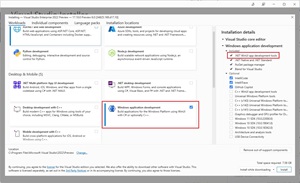 [Click on image for larger view.] The Windows Application Development Workload (source: Microsoft).
MacMichael noted that as part of the company's effort to make WinUI "one of the premier app development frameworks we recommend for native Windows app development," the team created a new Windows Dev Center page and streamlined its Get started with WinUI guidance along with partnering up with the Visual Studio team for the new workload and improved templates.
Previously, he indicated, developers had to manually search for each required component to develop with WinUI and the Windows App SDK. Addressing feedback the team made WinUI in the Windows App SDK more prominent so the latest tools and APIs are more accessible, available with just one click.
The team also repositioned some of the most-used WinUI templates on the New Project screen and gussied them up with a new icon, all as part of the renewed focus on WinUI.
MacMichael listed these steps to get started:
- Open the Visual Studio Installer.
-
Under Workloads > Desktop & Mobile, select the "Windows application development" workload.
- If you're developing in C#, congrats, you're finished! The workload includes .NET WinUI app development tools by default.
- If you'd like to develop in C++ or if you need the tools for Universal Windows Development, select the optional 'C++ WinUI app development tools' component. This will automatically select the Universal Windows Platform tools and C++ Universal Windows Platform tools components.
About the Author
David Ramel is an editor and writer at Converge 360.