News
Microsoft Previews GPT-4o Copilot Code Completion and .NET AI Template in Visual Studio
Things are happening quickly in the Microsoft-centric AI dev space, with the company previewing new AI features in Visual Studio 2022 ranging from a new .NET AI template to GPT-4o Copilot Code Completion.
Here's a look at each.
AI Chat Web App Template
Microsoft last week introduced a preview of the .NET AI Chat Web App template, aiming to streamline AI development within the .NET ecosystem. This template simplifies the creation of AI-powered chat applications that can interact with custom data, using the Retrieval Augmented Generation (RAG) pattern. Key features include chatting with custom data (using PDFs or user-provided data), support for local vector stores and Azure AI Search, and customizable UI components for chat and citation tracking. The template also provides code for data ingestion, caching, and processing, supporting various data sources and formats.
In addition to Visual Studio 2022, the template provides scaffolding and guidance within Visual Studio Code and with the .NET CLI.
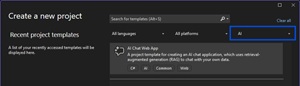 [Click on image for larger view.] AI Chat Web App Template (source: Microsoft).
Specifically, key features include:
- Chat with Custom Data: The template supports creating chat-based UIs that interact with sample PDFs or custom data using the RAG pattern.
- Local and Azure Integration: Developers can prototype with a local vector store or integrate with Azure AI Search for advanced configurations.
- Customizable Components: The generated code includes UI elements for chat interactions, citation tracking, and follow-up suggestions, all of which can be tailored to specific needs.
- Data Handling: Built-in support for data ingestion, caching, and processing allows developers to work with various data sources and formats.
"The .NET AI Chat template is designed to help you quickly build an AI-powered chat application to start chatting with custom data," Microsoft's Jordan Matthiesen, senior product manager, said. "This initial release focuses on a Blazor-based web app, built using the Microsoft.Extensions.AI and Microsoft.Extensions.VectorData abstractions."
Going forward, Microsoft plans to enhance the .NET AI template offerings in future updates by introducing an AI Console template, a Minimal API template, and support for .NET Aspire. Additionally, the templates will be included by default in the .NET SDK. The dev team is also exploring integration with Azure AI Foundry and collaborating with the Semantic Kernel team to expand template options for Semantic Kernel users.
More information is available in a .NET & AI Community Standup video titled "Exploring AI Templates for Visual Studio."
GPT-4o Copilot Code Completion Model
Microsoft announced this yesterday in Visual Studio 17.14 Preview 2 for GitHub Copilot users.
This model, derived from GPT-4o mini, has been further trained on over 275,000 high-quality public repositories spanning more than 30 programming languages, aiming to provide developers with more accurate code suggestions and enhanced performance.
While the regular GitHub Copilot tool provides both inline code suggestions and an interactive chat to assist with coding queries, explanations, and debugging, this offering is specifically optimized for real-time, inline code completions rather than chat-based interactions. It isn't replacing Copilot but rather enhancing the code completion experience by offering a more advanced and efficient model for certain users.
"We believe this model could further enhance your productivity in Visual Studio with higher quality code completions," said Microsoft's Simona Liao. "We encourage you to give it a try and share your experience with us."
Users can share any feedback on the company's Developer Community feature request/feedback site or via the IDE's built-in report a problem functionality.
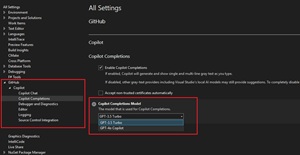 [Click on image for larger view.] Copilot Code Completion Model (source: Microsoft).
Developers can give it a try by selecting the "GPT-4o Copilot" option within Visual Studio's settings (Tools -> Options -> GitHub -> Copilot -> Copilot Completions). Note that Copilot Business or Enterprise users may need their administrator to enable the feature. Free Copilot users can also use it, with completions counting toward their monthly limit.
Both announcements reflect Microsoft's broader strategy to integrate AI deeply into its development ecosystem. These moves align with the company's ongoing efforts to enhance developer productivity, streamline AI adoption, and solidify its position as a leader in AI-driven software development.
About the Author
David Ramel is an editor and writer at Converge 360.