News
VS Code 1.10 Showcases New, Detailed Markdown Copilot Prompting
The new way to get the most out of GitHub Copilot is from markdown prompting, the practice of writing detailed, reusable natural-language instructions in markdown files -- like README.md or copilot-instructions.md -- to guide different AI models in generating context-aware, accurate code.
It highlighted the new Visual Studio Code 1.10 release (the April 2025 version) and two days later was featured in a 77-minute deep dive into Copilot modes and models.
"You can tailor your AI experience in VS Code to your specific coding practices and technology stack by using markdown-based instructions and prompt files," Microsoft's VS Code dev team said in announcing v1.10 on May 8.
Following the whole "prompt engineering" craze, the markdown approach gained momentum throughout 2023 as developers experimented with ways to guide GitHub Copilot more effectively. But the approach basically became official in January 2025, when GitHub introduced support for .github/copilot-instructions.md in public preview (see "Adding repository custom instructions for GitHub Copilot").
Microsoft, in describing more about the practice with two different approaches, introduced and emphasized support for markdown-based prompting as a core feature of AI-assisted development workflows:
Instruction Files (.instructions.md):
These files let developers define project-specific standards, frameworks, and best practices. Stored in the workspace or user data folder, they provide consistent context to the AI across projects.
Prompt Files (.prompt.md):
Reusable prompt templates that can be attached to AI chat requests. Developers use them to deliver detailed instructions or queries, improving the quality and accuracy of code suggestions.
These markdown files can be manually attached to chat sessions, or configured to apply automatically using the applyTo front matter header. This structured approach enables developers to scale AI use across teams while maintaining clarity and consistency in prompting.
Deep Dive
Two days later, on Saturday, May 10, the approach was detailed in a "GitHub Copilot deep dive: Model selection, prompting techniques & agent mode" video from GitHub developer advocates Kedasha Kerr and Jon Peck, who built a travel reservation app from scratch using Copilot inside VS Code and talked about modes and models. Over the course of the session, they explored Copilot's three interaction modes -- Ask, Edit, and Agent -- while directly comparing how different AI models performed at each stage. By switching between Claude 3.5 Sonnet, Gemini 2.5 Pro, GPT-4.1 and other models in real time, they revealed how each model handles building, refactoring, debugging, and documenting in practical development workflows.
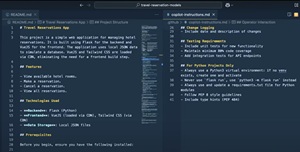 [Click on image for larger view.] Part of Peck's README.me and copilot-instructions Markdown Prompts (source: GitHub).
Key to this deep dive was Peck's markdown approach, used in a structured README.me file:
- App overview: A short description of the project (a travel reservation app).
- Feature list: Core functions like viewing hotel rooms and making reservations.
- Tech stack: Flask for the backend, Vue.js for the frontend (loaded via CDN to avoid complexity).
- Project structure: An outline of expected file and folder organization, written in markdown.
- Setup instructions: Steps like creating a Python virtual environment, installing dependencies, and expected environment variables.
- Styling and architecture preferences: Where to place templates, how to organize components, and even coding conventions.
- Developer notes: Hints and constraints meant to guide Copilot's decisions.
As the project's GitHub repo shows, extreme detail was taken to provide information such as project structure:
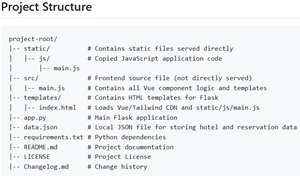 [Click on image for larger view.] Providing Project Structure (source: GitHub).
Peck explained that Copilot works best in Agent mode when it has a "really good solid prompt." By putting everything into a markdown file, he could:
- Feed consistent instructions to different models
- Iterate quickly by reusing or refining the README
- Treat the prompt like code -- version-controlled and shareable
You can read more about this deep dive in the article, "GitHub Devs Go Hands-On: Comparing Copilot AI Models Across Modes" at sister publication Virtualization & Cloud Review.
The new VS Code release was chock full of AI functionality -- as has been the case lately -- with a related GitHub Copilot changelog post kindly providing a ready-make tl;dr list:
Smarter Agent Mode and Chat Tools
- MCP support for streamable HTTP and images expands agent capabilities for server-based tools and image generation.
- Prompt and instructions files let you customize Copilot's behavior with reusable prompts and coding guidelines.
- Faster agent edits powered by OpenAI GPT-4.1 and Anthropic Claude Sonnet tools significantly improve performance, especially in large files.
- Autofix diagnostics can now automatically propose follow-up edits if errors are introduced during agent mode edits.
- Conversation summarization and prompt caching keep chat responsive and fluid even during long agent sessions.
Expanded Search and Tool Support
- The
#githubRepo tool lets you search code in any GitHub repository directly from Copilot Chat, even if it's not open locally.
- The
#extensions tool gives chat the ability to find and install extensions from the Marketplace.
- Semantic text search (experimental) now offers AI-powered keyword suggestions to help find relevant code faster.
Enhanced Editor Experience
- New Next Edit Suggestions (NES) model delivers faster, more relevant recommendations.
- Automatic import suggestions for JavaScript and TypeScript speed up common coding tasks.
- AI-powered quick fixes can generate alt text in HTML and markdown.
Other Features and Functionality
As far as non-AI features and functionality coming with v1.10, developers now see:
- Overtype Mode: Allows overwriting text in the editor, useful for editing fixed-width content like markdown tables.
- Persisted Find History: The Find control now retains search history across sessions and restores it when VS Code restarts.
- Configurable Paste and Drop Behavior: Lets users choose how files are inserted -- absolute paths, relative paths, or markdown links.
- Enhanced File Explorer Search: Highlights collapsed folders containing search matches and restores previous behavior.
- Move Views Between Side Bars: Enables repositioning view containers between the Primary/Secondary Side Bar or Panel via context menu.
- Hide Navigation Controls: Adds a setting to remove back/forward buttons from the title area for a cleaner UI.
- Improved Extension Search Results: Installed extensions are now shown at the top of search results in the Extensions view.
- Download Extensions Directly: Extensions can be downloaded (without installing) via the Extensions view context menu.
- View Extension Disk Usage: Displays how much disk space each extension consumes to help with storage management.
- Git Blame Decorations (Experimental): Shows Git blame info inline and in the status bar while editing.
- Configure Allowed Extensions: Lets admins define which extensions are allowed or blocked by publisher, version, or pattern.
About the Author
David Ramel is an editor and writer at Converge 360.