News
Visual Studio 2026 Arrives in Insiders Channel
At the ongoing VSLive! developer conference in San Diego, Microsoft today announced Visual Studio 2026 Insiders, a new release of its flagship IDE that pairs deep AI integration with stronger fundamentals and a new update model.
Specific highlights of the release, officially version 18.0, include tighter integration of GitHub Copilot throughout the IDE, with features such as adaptive paste, context menu actions, and AI-assisted profiling.
 [Click on image for larger view.] Visual Studio 2026 (source: Ramel).
Developers also gain performance boosts with faster solution loads and build cycles, plus productivity improvements like inline pull request comments, expanded code coverage tools, and enhanced editor controls. Visual Studio 2026 further introduces a refreshed Fluent UI design, 11 new themes for personalization, and full support for .NET 10 and C# 14, aligning the environment with modern workloads across web, cloud, and AI development.
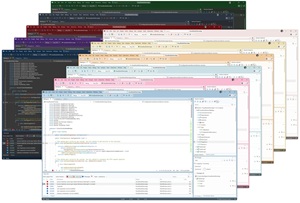 [Click on image for larger view.] Visual Studio 2026 redesigned using Fluent UI with 11 new tinted themes (source: Microsoft).
The release comes with the debut of the Insiders Channel, which replaces the long-standing Preview Channel as the way to test early features.
Insiders Channel Replaces Preview
Developers can now opt into the Insiders Channel to receive monthly builds with the latest updates. These builds install side-by-side with earlier versions and are fully compatible with extensions built for Visual Studio 2022, making migration straightforward. Microsoft describes this as a "future-ready IDE built for .NET 10 and modern development."
The Preview Channel was known for trying out bleeding-edge features and functionality and, while your mileage may vary, this reporter found a few startup errors upon the initial loading of the new release, so there might be some tweaking in order. Those three errors can be seen at the top of this screenshot:
 [Click on image for larger view.] Visual Studio 2026 Starup Errors (source: Ramel).
AI in the Workflow
"This release brings AI woven directly into the developer workflow, performance improvements that reset expectations for speed at enterprise scale, and a modern design that makes the environment feel lighter and more focused," said Mads Kristensen, principal product manager, in announcing the new offering.
With AI capabilities being central in Visual Studio 2026, GitHub Copilot is embedded across the IDE with several notable upgrades found in the release notes:
- Adaptive Paste: Copilot adjusts pasted snippets to match project conventions, including fixing errors, translating between languages, and formatting code.
- Context Menu Actions: Developers can now right-click for Copilot actions like explain code, optimize, generate comments, and add selections to chat.
- "Did You Mean?" Search: Copilot improves file searches by suggesting matches for typos or fuzzy queries.
- Profiler Agent: An AI-powered profiler analyzes CPU and memory, surfaces bottlenecks, and generates benchmarks, with natural language commands like "@profiler why is my app slow?".
- Bring Your Own Model: Developers can connect their own AI models (Anthropic, Google, OpenAI) for Visual Studio Chat.
Performance and Productivity Gains
Performance is another focus. Microsoft reports faster solution loads, smoother navigation, and shortened build/debug cycles. The new BenchmarkDotNet project template integrates profiling support to speed up diagnostics. Early testers have already noted improvements, with one reporting "It's blazing fast on all my projects."
Productivity upgrades include enhanced editor margins with unified line/column/character data and encoding controls, search exclusions for irrelevant files, inline pull request comments with Markdown rendering, and expanded code coverage tools now available in Community and Professional editions.
UI and Design Updates
The IDE has been redesigned with Fluent UI, delivering "crisp contrast, modern icons, fluid motion, and thoughtful accessibility updates". Eleven new tinted themes provide personalization, while a modernized settings experience replaces the legacy Tools → Options dialog with a streamlined design.
Platform and Language Support
Visual Studio 2026 ships with first-class support for .NET 10 and C# 14, enabling immediate use of the latest language features, framework updates, and APIs. Hot Reload reliability has been improved for Razor projects, C++20 is the new default for project templates, and new tooling updates expand diagnostics and IntelliSense.
What Developers Should Know
- Visual Studio 2026 Insiders is available now via the new Insiders Channel.
- Side-by-side installs ensure existing VS2022 environments remain intact.
- GitHub Copilot Free unlocks AI features without a trial or payment requirement.
- Monthly updates will deliver ongoing AI, design, and performance refinements.
Full details and release notes are available on the Visual Studio Learn site.
About the Author
David Ramel is an editor and writer at Converge 360.