News
WinUI Gallery 2.8 Adds Jump Lists, New Samples and Accessibility Improvements
Microsoft has released WinUI Gallery 2.8, updating its reference application for exploring WinUI 3 controls, samples, and design guidance.
The announcement was made on March 5 via the Windows Developer Blog in a post titled Announcing WinUI Gallery 2.8.
WinUI Gallery serves as a hands-on sample application demonstrating controls and patterns available in WinUI 3, which ships as part of the Windows App SDK. As Microsoft describes in the announcement, "WinUI Gallery is the go-to app for exploring WinUI 3 controls, samples, design guidance, and handy tools -- all in one place." The 2.8 update introduces jump list integration, new platform samples, accessibility fixes, and a series of code and tooling upgrades.
Jump List Integration
One of the headline additions in WinUI Gallery 2.8 is support for Windows taskbar jump lists. The GitHub release notes list "Adding jumplist support" as part of the changes in v2.8.0, implemented in pull request #2125. The feature enables users to access pinned or recent content directly from the taskbar entry for the app, aligning the Gallery experience with behaviors common in first-party Windows applications.
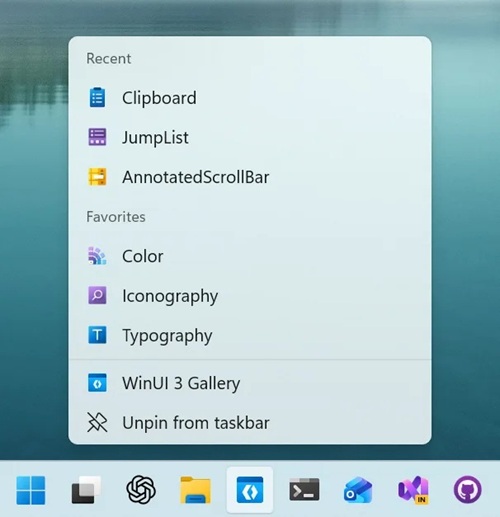 [Click on image for larger view.] JumpList Integration (source: Microsoft).
Microsoft states this addition demonstrates how developers can integrate jump list functionality into their own WinUI 3 applications using the Windows App SDK.
New Platform Samples
WinUI Gallery 2.8 adds multiple new samples to illustrate platform capabilities. According to the GitHub release page for v2.8.0, the update includes "Add AppWindow Title Bar Customization sample" (#2105) and "[Clipboard] Porting UWP clipboard samples to WinUI Gallery" (#2132).
The AppWindow title bar customization sample demonstrates how developers can modify the window title bar using AppWindow APIs available in the Windows App SDK. By incorporating this sample into the Gallery, Microsoft provides a working reference for customizing caption buttons and title bar layout within WinUI 3 desktop applications.
The clipboard sample ports existing UWP clipboard examples into the WinUI 3-based Gallery application. This gives developers a direct example of clipboard integration patterns in the current WinUI 3 and Windows App SDK environment.
Accessibility And Quality Improvements
In addition to new feature samples, the 2.8 release includes numerous accessibility and UI refinements. The GitHub release notes enumerate fixes such as "Fix duplicate screen reader announcements in Color page copy buttons" (#2091), "Fix Narrator silence on PipsPager page navigation" (#2093), and "Add narrator announcement for tooltip information icon" (#2123).
Other changes target layout consistency and visual polish, including fixes for corner radius mismatches, clipped focus rectangles, and adjustments to code sample layout and minimum height. The release notes also document "Fix app title bar gap beneath the caption buttons" (#2051), further aligning the sample app's appearance with Windows 11 UI expectations.
Tooling And Platform Updates
WinUI Gallery 2.8 also incorporates updates to its underlying development stack. The GitHub release notes list "Upgrade to WASDK 1.8.5 and remove TitleBar.IconSource workaround" (#2108) and "Upgrade to dotnet9 + slnx" (#2114).
The upgrade to Windows App SDK (WASDK) 1.8.5 ensures the sample app reflects the latest stable platform APIs available at the time of release. Moving to .NET 9 updates the project to the current .NET runtime generation supported by the Windows App SDK for desktop applications.
Additional project-level changes include enabling nullable reference types (#2069), centralizing app version information in the project file (#2055), and refactoring application settings to support both packaged and unpackaged modes (#2014). These updates position the Gallery as a reference implementation not only for UI controls but also for project structure and configuration practices.
Role Of The WinUI Gallery
The WinUI Gallery app functions as a living reference for developers building Windows desktop applications with WinUI 3. The project repository describes the app as one that "demonstrates the controls available in WinUI and the Fluent Design System." The source code is publicly available in the microsoft/WinUI-Gallery GitHub repository.
WinUI itself is described in the microsoft/microsoft-ui-xaml repository as "a user interface layer that contains modern controls and styles for building Windows apps." The repository notes that "The current generation is WinUI 3, which ships as part of the Windows App SDK."
The Gallery provides developers with a way to inspect XAML and C# implementations of controls, experiment with layout and styling, and explore API usage patterns in a production-grade sample application. Microsoft distributes the app via the Microsoft Store and maintains the codebase on GitHub, where community members can submit issues and pull requests.
Availability
WinUI Gallery 2.8 is available through the Microsoft Store and as source code via GitHub. The official announcement concludes: "All in all, WinUI Gallery 2.8 is packed with polish, new samples, and community love! Grab it from the Microsoft Store or check out the GitHub repo if you want to contribute."
The v2.8.0 release is tagged on GitHub and includes a full change log detailing enhancements, fixes, and dependency updates. Developers can review the complete set of changes on the GitHub release page and examine individual pull requests for implementation details.
About the Author
David Ramel is an editor and writer at Converge 360.