News
Hands On with OpenClaw Node for VS Code: Real Workflow, Real Friction
With all the hoopla around OpenClaw and its potential for proactive assistants and personal agents, I have been curious about how it would actually work in a real editor-based workflow.
To that end I've been testing how it works in Visual Studio Code (barely) and Visual Studio 2026 (basically not at all).
For those not familiar with that hoopla, OpenClaw is a locally running AI agent that connects LLMs (such as OpenAI, Anthropic, DeepSeek, or local models) to real-world actions on your own computer or server. Instead of interacting through a web app, you usually talk to OpenClaw through messaging apps like WhatsApp, Telegram, Discord, Slack, Signal, or iMessage.
You can also chat with it at its localhost "Control UI in your browser." I've found that's handy for troubleshooting when you can't get the damned thing to work with several of the OpenClaw extensions available for VS Code.
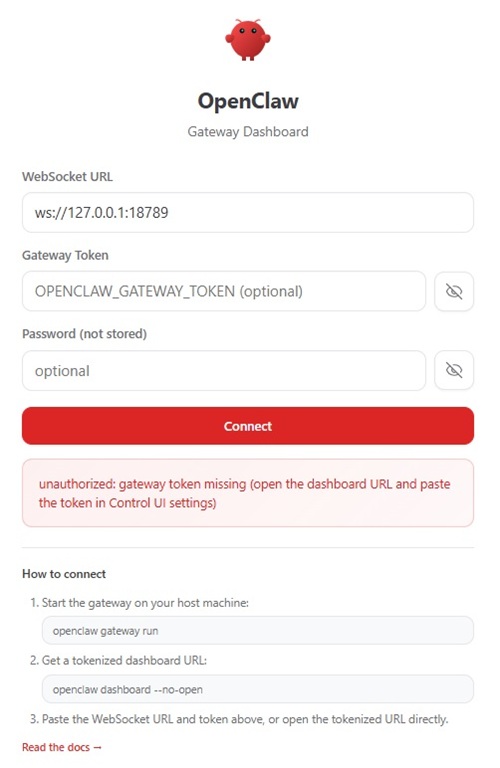 Don't Ever Reveal Your Token (source: Ramel).
The viral, open-source OpenClaw, as described in its official documentation, is a self-hosted gateway that connects channels, sessions, tools, and clients to an AI assistant. Its install flow and onboarding wizard focus on standing up the runtime, configuring a model provider, setting up a local gateway and workspace, and then using a browser-based dashboard as the main control UI.
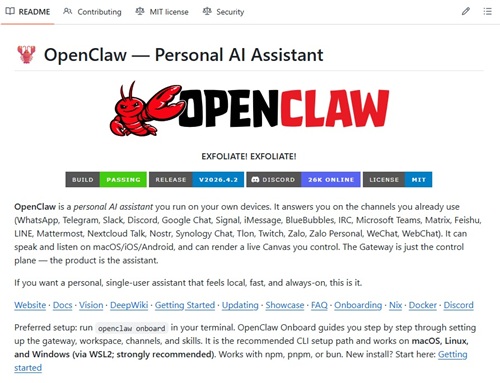 [Click on image for larger view.] OpenClaw Repo (source: GitHub).
After much frustration with other OpenClaw extensions, I turned my attention to the OpenClaw Node for VS Code extension, with about 1,300 installs.
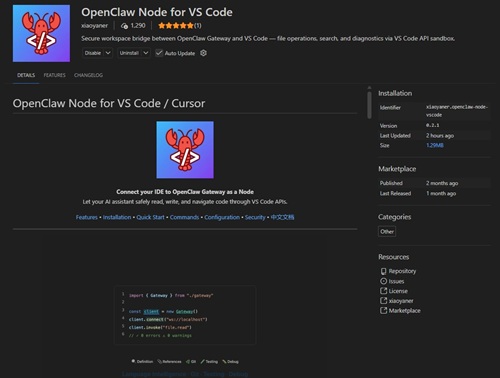 [Click on image for larger view.] OpenClaw Node for VS Code (source: GitHub).
The extension's pitch is straightforward enough. It turns VS Code into a Gateway-connected "node" that OpenClaw can talk to through the VS Code API sandbox. The Marketplace listing says it exposes more than 40 IDE commands spanning files, search, diagnostics, symbols, git, tests, and debugging, while keeping terminal access disabled by default and optionally requiring write confirmation. That is a much more interesting proposition than just one more status bar trinket or chat-adjacent OpenClaw helper.
So I decided to try a real proof of concept with it.
The PoC Was Not About Code
As I'm a journalist, not a coder, I was not interested in asking it to explain a function or summarize a repo. I wanted to see if it could handle an actual file-based workflow in my VS Code workspace, where I write my articles. All of my previous agentic AI testing has been focused on editorial workflow, partly because I hope to actually create useful tools, which I have (but which I'm pretty sure OpenClaw won't result in any contributions).
The task was simple on paper. Read my local .github/skills/editorial-assistant/SKILL.md file with voluminous instructions for formatting freelance articles. Read a rough article draft. Apply the formatting instructions from that skill file. Then write the formatted result back into the workspace as a new file. I have various forms of agentic AI tools that do this quite well.
OpenClaw's overall architecture made the answer less obvious than it should have been. As its docs make clear, OpenClaw is built around a long-running Gateway that owns the WebSocket control plane, typically on ws://127.0.0.1:18789, with a browser-based Control UI usually opened at http://127.0.0.1:18789/. So even with the VS Code node installed, the center of gravity is still that local Gateway and browser UI, not the editor itself.
That turns out to matter a lot.
What the Extension Actually Is
If you are picturing a Copilot-style chat panel inside VS Code, stop right there. That is not what this is.
The Node extension is basically a bridge. It installs into VS Code, connects to a running OpenClaw Gateway, and makes the editor addressable from OpenClaw. The prompting still happens through OpenClaw's browser interface. The extension is the pipe, not the conversation.
That distinction is important because it explains both the promise and the frustration.
The promise is that OpenClaw can potentially act on real editor state instead of just reading files out of a folder. The Marketplace listing explicitly calls out file operations through the VS Code API, workspace info, diagnostics, symbol/navigation features, and other IDE-aware actions. The security model is also sensible on paper: operations are limited to workspace directories, terminal commands are off by default, and writes can be gated through confirmation prompts.
The frustration is that all of this still sits on top of OpenClaw's existing Gateway-first world, and on Windows that world can get weird fast.
Just a few issues:
- The built-in setup wizard did not behave cleanly and the overall setup took far more effort than expected.
- The OpenClaw Gateway was a single point of failure -- when it went down, both the browser dashboard and the VS Code connection went down with it.
- Node pairing and approval were unreliable, including pending approval states and short-lived pairing requests that could expire before approval completed.
- The documented example command
workspace.info did not work as expected on Windows. - There was command-name confusion because the working commands often needed the
vscode. prefix, such as vscode.workspace.info, vscode.file.read, and vscode.file.write. - Some commands appeared blocked by the Windows allowlist, even when the docs made them sound straightforward.
- The node would not accept absolute file paths, forcing everything to be workspace-relative.
- Passing JSON through
--params on Windows was painful because PowerShell, cmd.exe, spaces in paths, and the CLI all fought over quoting and argument parsing. - Spaces in the OneDrive-based workspace path made argument parsing even worse.
- Attempts to pass JSON params produced multiple errors, including JSON parse failures and "too many arguments" failures.
- At one stage, file reads only became reliable after bypassing shell quoting issues entirely.
- There was also a side issue with output decoding that had to be handled more carefully.
- Writing the formatted HTML back through the node was less stable than reading files.
- The Windows
openclaw.cmd wrapper choked on large HTML payloads because of the angle brackets. - The workaround required bypassing the Windows wrapper and going directly to the underlying JavaScript entry point.
- Even after the workflow succeeded, the whole experience still felt more like infrastructure and debugging than a polished editor-native feature.
- The final output was useful but imperfect, so the PoC proved the concept more than it proved production readiness.
Note that list came from AI, as I had OpenClaw itself and VS Code's GitHub Copilot (Claude Sonnet 4.6) guide me through the process, fix problems and take notes along the way -- because I was totally lost when things got really technical. If, at this point, you want the nitty-gritty details, plough on.
The Setup Was Where the Wheels Started Wobbling
I had already been through the broader OpenClaw setup, so I was not coming in cold. I already had the Gateway running and I already knew the general OpenClaw model: local service first, browser dashboard second, actual workflow maybe third.
Even so, getting the Node extension into a clean working state was way harder than it should have been. Some of it seemed to involve a previous OpenClaw extension that was still installed, and when I disabled it, things went better. My bad.
The First Surprise Was Command Names
The extension docs and examples made me think the first check would be trivial: ask the node for workspace info and move on.
It was not trivial.
The example test command on the Marketplace page uses workspace.info. That sounds nice and clean. In practice, what finally worked for me was the namespaced form that exposed the actual VS Code-flavored command surface. That was a recurring pattern in this PoC: the conceptual command and the actually working command were not always the same thing, at least not in the way I encountered them on Windows. Some sources suggest Linux is better, but on another machine using WSL I also had big issues.
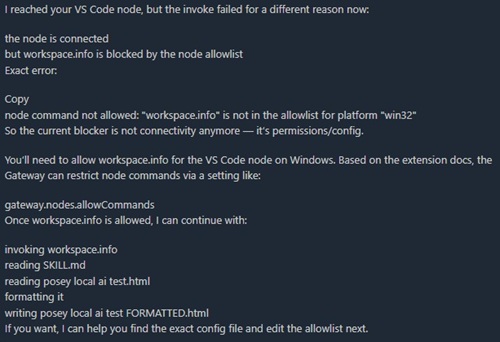 [Click on image for larger view.] OpenClaw Response Showing Workspace.info Blocked by Allowlist on Windows Node (source: Ramel).
Once I got the working workspace-info call, I had the actual workspace root and could stop guessing. That was the moment the PoC started to become real. OpenClaw was no longer operating in the abstract. It knew where the workspace was, and I knew it knew.
That was also when I hit the next rule: no absolute paths. The node wanted workspace-relative paths only. As security models go, that is defensible. As discoverability goes, it was one more thing I learned by slamming into it.
Then Windows Did What Windows Does
The hardest part of the whole exercise was not the editor integration. It was getting JSON parameters through the Windows shell stack without everything catching fire.
OpenClaw's CLI expects JSON with --params. PowerShell has opinions about quotes, and cmd.exe has opinions about quotes. Paths with spaces have opinions about quotes. And HTML payloads, as I eventually learned, have opinions about angle brackets too.
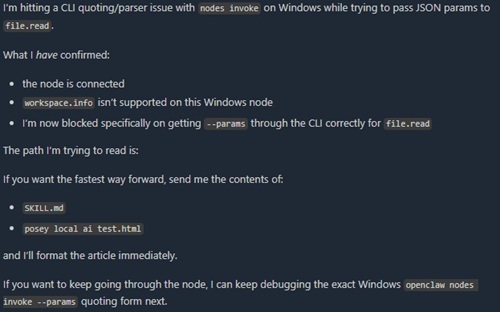 [Click on image for larger view.] OpenClaw Response about Windows CLI Quoting and file.read Parameter Parsing (source: Ramel).
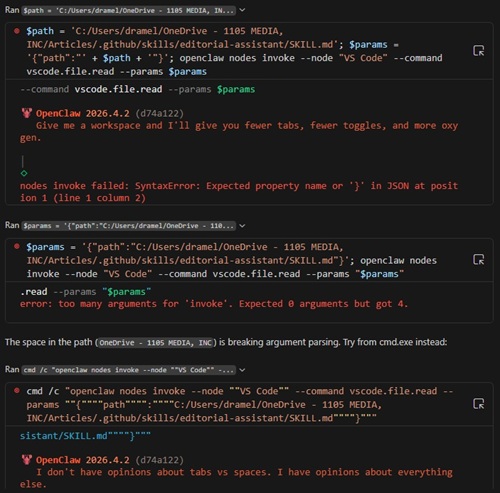 [Click on image for larger view.] Copilot Responses about Windows CLI Quoting and file.read Parameter Parsing (source: Ramel).
I burned an absurd amount of time just getting reliable command invocations working cleanly. Once I did, the actual read path was straightforward enough: read the skill file, read the draft, and let OpenClaw go to work. But the command plumbing on Windows was a real tax on the whole experience.
That is why one reply to the recent Omar Shahine OpenClaw/Microsoft 365 post about a new company champion for OpenClaw for Microsoft 365 has stuck with me. The comment read: "Can you just give us a decent CLI?" That was in a different context, but it lands here too. OpenClaw's bigger vision may be proactive assistants and personal agents, but for technical users the basics still matter. A lot. If the CLI and local workflow feel rough, people notice. They notice before they notice the architecture. They notice before they notice the vision. They definitely notice before they are ready to be dazzled.
Where the PoC Finally Turned the Corner
Once the command syntax, relative paths, and read flow were stable, the editorial task itself was almost refreshingly normal.
OpenClaw read the local SKILL.md file. It read the article draft. It applied the instructions. It generated a formatted output file.
That is the part I do not want to underplay. Because after all the friction, the underlying capability really did show up.
This was not just a toy prompt asking an AI to prettify a paragraph. It was a workspace-aware loop. File in, local instructions applied, file out. That is basically the same baseline I had been chasing in an earlier OpenClaw/VS Code article, just with the Node extension now serving as the bridge into the editor-aware side of the system.
The write-back path even had one genuinely reassuring feature: permission gating. The extension supports optional write confirmation, and the Marketplace docs explicitly call out openclaw.confirmWrites for prompting before each write. In a world where AI tooling increasingly wants to act instead of just suggest, that is a sensible bit of friction to keep.
And Then the Batch Wrapper Broke on HTML
Because of course it did.
Reading turned stable before writing did. The first real write-back attempt with a large HTML payload ran straight into another Windows-specific mess: the wrapper around the OpenClaw CLI choked on the content. The problem was not that the node could not write a file. It was that the Windows launcher did not appreciate being handed a big blob of HTML. Too many angle brackets. Too much markup. Too much life experience, apparently.
The workaround was not elegant, but it was effective: bypass the wrapper and go to the underlying JavaScript entrypoint directly. Once that happened, the write succeeded and the output showed up in the workspace.
That moment mattered. Not because it was graceful. Because it proved the loop closed.
How Good Was the Output?
Not perfect. Not publish-and-go. But good enough that I would call the proof of concept successful.
It handled a lot of the expected cleanup and formatting correctly. It applied the local instructions rather than improvising from thin air. It produced a shaped output file that looked like a real first pass instead of random AI confetti.
That was the key question going in. Not "Can AI format text?" Of course it can. The real question was whether this particular stack -- OpenClaw Gateway, browser UI, Node extension, VS Code workspace, local skill file, Windows command plumbing from the underworld -- could produce a real file-based workflow inside the editor ecosystem.
The answer was yes.
Was It Worth It?
That depends on what you think you are evaluating.
If you are evaluating the concept, yes. This extension does something real. It is not just decorative OpenClaw merch for VS Code. The architecture is meaningful. The sandbox model is meaningful. The fact that OpenClaw can use the node to operate on workspace files and potentially much more than that is meaningful.
If you are evaluating the current Windows experience as a practical everyday tool for a one-off editorial task, then no, not really. I spent far too much time fighting setup, naming, quoting, and wrapper behavior to get to a result I could have produced faster with more mature tooling.
That does not make the Node extension a bust. It just means the value proposition likely is more obvious for deeper developer workflows than for simple content chores. The Marketplace listing's emphasis on diagnostics, symbol intelligence, tests, and debugging is a clue there. This thing looks built for people who want an agent to interact with what VS Code knows, not just what a filesystem contains. My editorial PoC was useful precisely because it was a little off-label. It showed the mechanism working outside the extension's obvious comfort zone.
Bottom Line
OpenClaw Node for VS Code is one of the more interesting things I have tried in this still-chaotic OpenClaw-meets-editor space.
It also put me through hell.
Both things can be true at once.
The extension is real. The workflow is real. The friction is also very real, especially on Windows. Right now it feels less like a polished VS Code feature and more like infrastructure peeking through the floorboards. But the floorboards matter. Underneath all the rough edges, I got what I wanted out of the test: proof that OpenClaw could use a VS Code-connected node to read local editorial instructions, process a draft, and write a formatted result back into the workspace.
That is not nothing. It is not even trivial.
It is just not smooth yet.