News
VS Code Updates Boost AI Agents, Terminal Control and Copilot Workflow
In the dev team's new weekly release cadence, Visual Studio Code's two most recent releases pushed further into agent-centric development, with version 1.115 on April 8 and version 1.116 on April 15 both centered heavily on chat, agents and GitHub Copilot-related workflows. In practical terms, the pair of updates added a new agent companion app, more direct terminal control for agents, better tools for tracing past agent behavior and new controls for tuning reasoning in Copilot CLI.
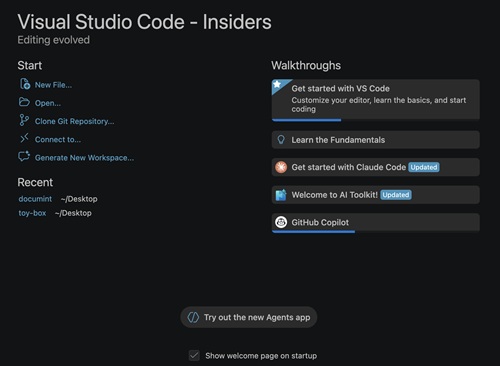 [Click on image for larger view.] "We've added a new entry point to Try out the new Agents app from the VS Code welcome page." (source: Microsoft).
The bigger story is that Microsoft is extending AI assistance in VS Code beyond inline chat. In these two releases, the editor gained more infrastructure for running, supervising and debugging agent sessions across repos and terminals, while also lowering friction by making GitHub Copilot available as a built-in capability in 1.116 instead of requiring a separate GitHub Copilot Chat extension installation.
Agents App Expands Beyond the Editor
The headline AI addition in the 1.115 release notes was Visual Studio Code Agents, a new preview companion app that ships alongside VS Code Insiders and is described as being built for agent-native development. Microsoft said the app can parallelize tasks across projects by letting developers kick off agent sessions across multiple repositories in parallel, each isolated in its own worktree, while also providing ways to monitor progress, review diffs inline, leave feedback for agents and create pull requests without leaving the app. The release notes also said that custom instructions, prompt files, custom agents, MCP servers, hooks and plugins carry over into the new app, which makes the feature more significant than a standalone experiment because it reuses the same customization layer developers are already building around chat and agents.
Version 1.116 continued that work rather than treating the Agents app as a one-off preview item. Microsoft added several refinements to the app, including reasoning level selection, automatic plan mode handling for CLI sessions involving planning, the Files tab showing by default in Changes, response and rendering improvements, and a rename to Visual Studio Code Agents -- Insiders. The release also added a new entry point from the VS Code welcome page, which indicates Microsoft is trying to make the app easier to discover inside the broader product experience.
Agent Debugging and Copilot Controls Get More Practical
The most important AI-focused addition in the 1.116 release may be the new Agent Debug Log workflow. Microsoft said the Agent Debug Log panel shows a chronological event log of agent interactions during a chat session and can now display not only the current session but previous sessions as well, with logs persisted locally on disk. For developers working on prompt files, custom agents, skills or other chat customizations, that turns agent behavior into something that can be inspected after the fact instead of only watched live in a single session.
The same release also added a new way to configure thinking effort in Copilot CLI sessions. According to Microsoft, developers can choose a reasoning model in the language model picker and then select an effort level to balance response quality and latency, with available levels varying by model and no submenu shown for non-reasoning models. That makes the CLI workflow more configurable for teams deciding when they want deeper reasoning versus faster turnaround.
Another notable change in 1.116 was that GitHub Copilot became built in, which Microsoft summarized as letting users start using AI without installing the GitHub Copilot Chat extension. The release notes do not document additional setup details in that highlight line, but the change matters because it reduces one more step between installing VS Code and accessing its AI tooling.
Terminal Tooling Becomes a Core Agent Surface
Across both releases, terminal integration emerged as one of the clearest signs of where VS Code's AI work is heading. In 1.115, Microsoft added a new send_to_terminal tool so an agent could continue interacting with a terminal after it had moved into the background, addressing a prior limitation where background terminals were effectively read-only apart from output retrieval. The same release also introduced experimental background terminal notifications so the agent can be notified automatically when a background command finishes or requires input.
Version 1.116 broadened that model by extending send_to_terminal and get_terminal_output to foreground terminals too, not just background terminals created by the agent. Microsoft said that means agents can now read from and send input to any terminal visible in the terminal panel, including a running REPL or interactive script. The update also removed an LLM-based prompt-for-input detection step that previously triggered extra model calls on terminal output, replacing that with direct handling through send_to_terminal and user deferral through the question carousel when needed.
Taken together, the two releases show Microsoft concentrating less on isolated AI novelties and more on the mechanics developers need to make agent workflows usable day to day: a dedicated app, persistent debugging, adjustable reasoning in the CLI and deeper control over active terminal sessions. That pattern is more notable than any single UI tweak because it ties chat, agents, CLI and terminal execution into one increasingly connected workflow.
Other Notable Changes in 1.115 and 1.116
The remaining updates were a mix of AI-adjacent workflow improvements, UX changes and a small set of deprecation and fix notes.
- 1.115 -- Integrated browser tool labels: Microsoft said browser tool calls now use more descriptive labels and include a link that goes directly to the target browser tab. The change is aimed at making agent actions in the integrated browser easier to interpret and review.
- 1.115 -- Long-running Playwright scripts: The
Run Playwright Code tool now has better support for scripts that run longer than five seconds by returning a deferred result for the agent to poll. That should help agents manage browser automation tasks that do not complete quickly.
- 1.115 -- Fewer duplicate browser tabs: Agents are now more heavily discouraged from opening duplicate tabs for the same host. VS Code avoids opening a new tab when one for the same host is already available unless the agent passes an explicit flag.
- 1.115 -- Pinch-to-zoom in integrated browser: On macOS, the integrated browser now supports pinch-to-zoom up to 3x. Microsoft said this is visual magnification and does not reflow page layout like standard browser zoom.
- 1.115 -- Deprecations: Microsoft said there were no new deprecations in 1.115. The company also reiterated that Edit Mode, officially deprecated in 1.110, remains temporarily re-enableable through version 1.125 before full removal begins in 1.125.
- 1.116 -- Customizations welcome page: The Chat Customizations dialog now includes a welcome page that summarizes agent customization types. It also adds a "Customize Your Agent" input that lets VS Code draft agents, skills and instructions from a natural-language description.
- 1.116 -- Tool confirmation carousel: An experimental confirmation carousel lets users review and approve multiple tool calls without scrolling through the full conversation. Microsoft said it is enabled by default in VS Code Insiders and is gradually rolling out to Stable.
- 1.116 -- Chat UX improvements: Code diffs now render directly in the chat conversation, and Microsoft said chat rendering and send performance were improved. The release also made subagent progress easier to distinguish visually.
- 1.116 -- Agents app refinements: Beyond the headline AI features, 1.116 added plan mode handling, default Files tab behavior in Changes, visual and rendering refinements, and a new welcome-page entry point for trying the Agents app. The app name was also changed to Visual Studio Code Agents -- Insiders.
- 1.116 -- Accessibility support in the Agents app: Microsoft added keyboard and screen reader support features for the Agents app, including an accessibility help dialog and new keybindings to focus major views. The release also added a verbosity setting for announcements in the chat input.
About the Author
David Ramel is an editor and writer at Converge 360.