News
Devs Weigh In on Visual Studio Database Tools
Microsoft's Mads Kristensen, principal product manager for Visual Studio, prompted a new discussion about database tooling in Microsoft's flagship integrated development environment (IDE), asking on social media whether Visual Studio "should have the option to include more database tools for managing SQL Server and other database types?"
The "Friday question" poll, shown in the screenshot below, drew 34 votes and ended with a narrow plurality in favor: 44.1 percent answered "Yes," 41.2 percent answered "No," and 14.7 percent answered "Either way." The small sample size limits what can be inferred from the result, but the replies show a familiar split in the Visual Studio community: some developers want more database features inside the IDE, while others say database work should remain in dedicated tools such as SQL Server Management Studio (SSMS), Visual Studio Code extensions or third-party IDEs.
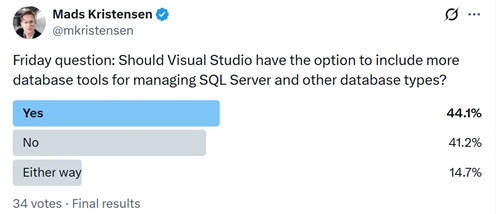 Final Results (source: X).
One of the most-liked responses argued against expanding Visual Studio in that direction: "We already have SSMS for that. I've never seen the value in Server Explorer." Another highly engaged response shifted the issue from adding more database capabilities to maintaining the current ones: "Visual Studio should fix and support the current database features..." That response linked to a Developer Community suggestion titled "Visual Studio 2026 still using old SQL-Style Projects."
SDK-Style SQL Projects Surface as a Flashpoint
The Developer Community item, published Sept. 12, 2025, centers on SDK-style SQL Projects support. The original report says the team had shifted to SDK-style SQL Projects after Visual Studio 2022 announced the integration, but found that support still was not available in the expected way in Visual Studio 2026 Insider. "What is weird to me is, I can create SQL-Projects, the integration seems really good, but it uses the old style of SQL Projects? What am I missing here?" the report says.
The Developer Community item was marked "Under Review" and had 267 votes. Microsoft's SQL Server Data Tools, SDK-style (preview) documentation says Visual Studio 2026 does not support SDK-style SQL projects, and that "the original SQL projects are the only SQL project format available in that version of Visual Studio." The same page says Visual Studio 2022 is the only Visual Studio version that contains SDK-style SQL projects in the SQL Server Data Tools, SDK-style (preview) component, and warns that the preview feature does not support side-by-side installation with original SQL projects.
That limitation appears to be central to the Developer Community discussion. In one Microsoft response on the thread, Drew Skwiers-Koballa said developers could use Microsoft.Build.Sql projects in Visual Studio Code, original SQL projects in Visual Studio 2026, the preview of Microsoft.Build.Sql projects in Visual Studio 2022 or the community MsBuild.Sdk.SqlProj workaround in Visual Studio. He said Microsoft was continuing to develop tooling for Microsoft.Build.Sql projects and monitoring interest in the suggestion item.
Developers Point to Tooling Fragmentation
The post's replies also reflected broader questions about where database development should live across Microsoft's tooling lineup. One reply suggested using the discontinued Azure Data Studio as a model. Another suggested adding support for Redis, Cosmos DB and Table Storage. Others asked for PostgreSQL support, database entity relationship (ER) design tools, schema IntelliSense for inline SQL, and AI-assisted database refactoring.
Microsoft's own tooling direction has been changing. Azure Data Studio retired on Feb. 28, 2026, and Microsoft directs users to migrate to Visual Studio Code with the MSSQL extension for continued support. Microsoft says existing queries, scripts and database projects work in Visual Studio Code without conversion, and says the MSSQL extension includes schema management, query execution, AI-powered assistance and integration with source control and continuous integration/continuous deployment (CI/CD) workflows.
That context helps explain why Kristensen's poll drew responses beyond a simple yes-or-no feature request. For some developers, additional database tooling inside Visual Studio could reduce context switching. One reply said it is practical to have code tabs and database table tabs open in the same window. Another said JetBrains Rider's database tools were a major reason for switching away from Visual Studio, while noting that Visual Studio had weak support beyond Microsoft SQL Server in the developer's experience.
For others, the concern is Visual Studio's scope and performance. One translated reply said the developer did not need unnecessary features and wanted the IDE to remain lightweight. That concern echoes a recurring Visual Studio debate: whether the IDE should absorb more specialized workflows or keep them in optional workloads and extensions.
Microsoft Documentation Points to Multiple Paths
Microsoft documents several database development paths across Visual Studio, Visual Studio Code, command-line tooling and SQL Server Management Studio. SQL Server Data Tools (SSDT) remains available for Visual Studio, while Microsoft also documents Visual Studio Code's SQL Database Projects extension, SqlPackage and database DevOps workflows in SQL Server Management Studio. That spread of tooling helps explain why the poll responses ranged from requests for deeper Visual Studio integration to arguments for keeping database work in dedicated tools.
Microsoft's SQL database projects documentation says database development can be integrated into continuous integration and continuous deployment (CI/CD) workflows, and that the build process validates relationships between objects and syntax against the target platform. That makes the Visual Studio support question more than an editor preference for teams using database projects as part of application lifecycle management.
The Developer Community thread shows that some developers who moved to SDK-style projects now want clarity on whether Visual Studio 2026 will support them directly. One commenter cited Microsoft guidance that new development should consider SDK-style SQL projects because that format is supported going forward, then objected that the Visual Studio 2026 experience did not match that expectation. Another summed up the issue as a communication problem around Microsoft's SQL development technologies and tooling direction.
Small Poll, Larger Signal
The social media poll itself was small, but the discussion around it shows three distinct requests from Visual Studio users: some want more first-class database tooling in Visual Studio, some want existing SQL project and SSDT features fixed or modernized first, and some prefer that database management stay in specialized tools such as SSMS or Visual Studio Code extensions.
Kristensen's question framed the issue as an option, not a default feature set. That distinction matters for Visual Studio, where workloads and optional components already determine much of the installed experience. The Developer Community discussion suggests that for database developers, the unresolved question is not only whether Visual Studio should add more database tools, but how Microsoft plans to align existing database project formats, SSDT components and Visual Studio Code-based SQL tooling.
About the Author
David Ramel is an editor and writer at Converge 360.