News
VS Code 1.121 Adds Remote Agents, Boosts Claude Code Functionality Again
Microsoft released Visual Studio Code 1.121 on May 20, adding remote agent sessions, more configurable language model settings, terminal changes for agent-driven workflows and new built-in preview support for HTML files and Mermaid diagrams. It also features another nod to the rise of Claude Code in the editor.
The release is documented in the official Visual Studio Code 1.121 release notes, which state: "This release adds built-in Mermaid and HTML previews, streamlines terminal tool behavior for agents, and lets you run agent sessions on remote machines." The update continues the recent emphasis on AI-assisted and agent-oriented development inside VS Code, which also propelled the code editor's new weekly release cadence.
Claude Agent Auto Mode Added in Preview
The Claude Agent now supports Auto mode, which lets Claude execute without permission prompts. Microsoft says a separate classifier request reviews actions before they run, blocking actions that escalate beyond the user request, target unrecognized infrastructure or appear driven by hostile content Claude read.
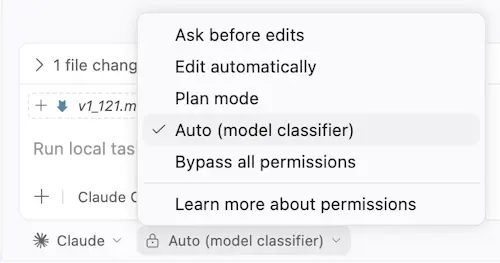 Claude Agent Auto Mode (source: Microsoft).
This is a furtherance of the team's elevation of Claude Code to a first-class citizen in the VS Code ecosystem, along with other dev tooling (see "Special Embrace? VS Code Adapts to Claude Code's Ecosystem").
The setting github.copilot.chat.claudeAgent.allowAutoPermissions enables the Auto option in the permission mode picker. The release notes also include a note about a separate setting, github.copilot.chat.claudeAgent.allowDangerouslySkipPermissions, for allowing Bypass all permissions to appear, describing this as fully unattended execution with no safety checks.
Remote Agent Sessions Arrive in Preview
The update features experimental support for running agent sessions on a remote machine from the Agents window. The remote machine must be owned by the user and reachable through SSH or dev tunnels. For SSH, users can select entries from an existing ~/.ssh/config file or type a user@host value. For dev tunnels, users can select tunnels already created by running code tunnel on the target machine.
Microsoft said the feature is similar to, but not the same as, VS Code's remote development extensions. The Agents window connects to the remote machine, then either downloads and installs the VS Code CLI through SSH or connects to a running CLI server through a dev tunnel. It then starts an agent host process that runs a new agent loop built on the Copilot SDK.
Microsoft's Agents documentation says remote sessions can be used when developers want to use a remote machine's resources, keep sessions running while away, or monitor progress from another device. The documentation also says multiple clients can connect to the same agent host simultaneously and see a synchronized view of sessions.
The agent host is a long-lived process and that running sessions continue on the remote machine even if the client disconnects. Microsoft also introduced the Agent Host Protocol, described on its specification site as "A portable, standalone server protocol that gives multiple clients a synchronized view of AI agent sessions through immutable state, pure reducers, and write-ahead reconciliation." Documentation says the protocol is under active development and is not yet stabilized.
Agent Observability Gets Grafana Integration
The update also adds a prebuilt Azure Managed Grafana dashboard for OpenTelemetry signals emitted by agents in VS Code. Developers can point VS Code at an OpenTelemetry Collector that forwards to Azure Application Insights, then import the Azure Managed Grafana dashboard to visualize agent operations, token usage, chat sessions, tool calls, per-model response time and time to first token.
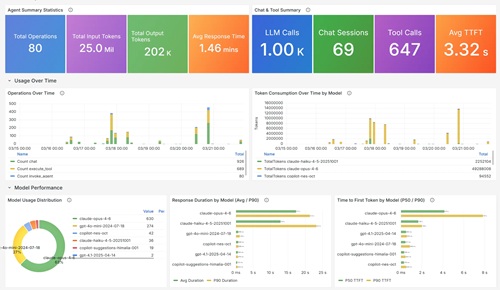 [Click on image for larger view.] Grafana Copilot Dashboard (source: Microsoft).
The related OpenTelemetry monitoring documentation says Copilot Chat can export traces, metrics and events through OpenTelemetry, giving visibility into agent interactions, large language model calls, tool executions and token usage. The signals follow the OpenTelemetry GenAI Semantic Conventions so the data works with any OpenTelemetry-compatible back end.
Microsoft Learn's Azure Managed Grafana guide says GitHub Copilot emits OpenTelemetry signals when configured through VS Code settings. The same guide says the GitHub Copilot dashboard surfaces total operations, input and output tokens, chat sessions, tool calls and per-model latency, including average duration and P50/P90 time to first token.
Language Model Settings Add More Control
The release also adds more control over how VS Code uses language models for utility tasks. VS Code uses utility models in the background for chat-related tasks such as generating titles, summaries, commit messages, rename suggestions, prompt categorization and intent detection. By default, the release notes say those tasks use utility models provided by GitHub Copilot.
VS Code 1.121 introduces the chat.utilityModel and chat.utilitySmallModel settings. The first setting overrides the model used for general utility flows. The second overrides the model used for fast, lightweight utility flows, with the release notes recommending a fast and inexpensive model for that setting. If the settings are left at Default, VS Code continues to use the GitHub Copilot-provided utility models.
Microsoft's language model documentation says VS Code provides access to multiple built-in language models and lets users switch models for chat, inline suggestions and utility tasks. It also says developers can add more models by bringing their own API key.
The release notes also describe a new Bring Your Own Key provider for VS Code Insiders. The Custom Endpoint provider lets users plug any Chat Completions, Responses or Messages-compatible endpoint into Copilot Chat from a single configuration. Microsoft says the provider replaces the legacy OpenAI Compatible provider, which only supported Chat Completions and is now marked for deprecation. The release notes say the Custom Endpoint provider is currently in preview and only available in VS Code Insiders.
Integrated Browser and Markdown Preview Add Built-In Capabilities
Also new is a built-in way to preview local HTML files in the Integrated Browser. Previewing an HTML file previously required installing an extension. Developers can now use Open in Integrated Browser by right-clicking an HTML file in File Explorer, right-clicking an editor tab when an HTML file is open, or selecting the Preview icon in the editor title bar when an HTML file is active.
The Integrated Browser also gets changes for adding elements to chat. Microsoft says it reworked the element selection UI for richer functionality and theming support. Users can click and drag to select a range of elements, and can right-click anywhere in a page to attach elements to chat.
For Markdown and notebooks, Microsoft merged Matt Bierner's Markdown Preview Mermaid Support extension into VS Code as a built-in extension named Mermaid Markdown Features. The new built-in extension adds Mermaid diagram rendering to the built-in Markdown preview, Markdown cells in notebooks and chats.
Also new is a change in how YAML front matter appears in Markdown preview. The markdown.preview.frontMatter setting now controls the rendering behavior. By default, VS Code displays front matter as a table at the top of the preview instead of hiding the preamble. The available options are table, codeBlock and hide.
Terminal Changes Target Agent Workflows
The release includes several terminal updates aimed at agent sessions. VS Code now sets a VSCODE_AGENT environment variable for agent-initiated terminal commands. Command-line tools can check that variable to switch to machine-readable output, suppress progress animations or skip prompts that could otherwise block an agent session.
The chat UI now shows when a terminal command is still running in the background after a tool call returns. Tool invocations show a running-in-background state with a Show action that reveals and focuses the underlying terminal. When the command finishes, the header returns to the completed state.
VS Code now automatically disposes background terminals created by the chat agent when their commands complete, while preserving command output in the chat UI. If a user reveals a background terminal with Show, it stays open for inspection or interaction.
Terminal output compression is also broader in this release. The chat.tools.compressOutput.enabled setting now covers more verbose command output before it is sent back to the model. The release notes identify common test runners, build tools, linters, Docker commands and package managers as areas with expanded coverage, including commands such as pytest, jest, cargo test and tsc.
Another change concerns how sensitive terminal prompts are handled in chat terminal commands. When a command reaches a password, passphrase, PIN or verification-code prompt, VS Code intercepts it. In default permissions mode, chat shows a confirmation dialog that lets the user focus the terminal and enter the secret there. In auto-approve flows, VS Code cancels the command and tells the model not to retry or request the secret.
About the Author
David Ramel is an editor and writer at Converge 360.