C# Corner
The .NET Command Pattern, Part 2
How to implement an undo/redo system using the Command pattern in the .NET Framework.
Part 1 of this series demonstrated how the Command pattern can be used to handle UI actions in a unified manner. The Command pattern is also very well suited for handling a sequence of actions that can be rolled back. This article will show how to create an undo system for a basic data entry application for which the user can enter information for a presentation, and cut, undo, or redo their changes.
Building the Command State Manager
First, create a new C# WPF application. Next, create a folder named Commands. The undo system will contain two essential components: the CommandStateManager and the IUndoCommand interface. The IUndoCommand interface will provide the contract for implementing an undoable command. The interface inherits the System.Windows.Input.ICommand interface and adds on a new Undo command. Here's the IUndoCommand source:
using System;
using System.Windows.Input;

namespace VSMCommandPatternUndo.Commands
{
    public interface IUndoCommand : ICommand
    {
        void Undo();
    }
}
Then, add the ICommand interface to the Commands folder. Next up is to tackle the CommandStateManager class, which will be responsible for keeping track of the executed commands and maintaining what commands may be undone or redone.
I chose to implement the CommandStateManager as a singleton so it may be easily accessed via any added commands directly used by WPF. Refer to Leveraging Lazy Loading in .NET 4.0 for more information on using Lazy loading to implement the Singleton pattern.
The CommandStateManager keeps track of two stacks: one for commands that may be undone, and one for commands that may be redone. Next there are the CanRedo and CanUndo properties that will be utilized by the undo and redo commands to come. The CanRedo and CanUndo properties are flags indicating if there are any undo or redo commands available.
Executed, Undo and Redo
Now to the heart of the system: the Executed, Undo and Redo methods. The Executed method adds an executed method to the undo stack and notifies any INotifyProperty subscribers that an undo command is ready. The Undo method checks if there are any available IUndoCommands and invokes the Undo method on it.
The Undo method adds the command to the stack of redo commands and notifies any subscribers that a redo command is available. The Redo command checks for any redo commands, pops off the top redo command and executes it. It also adds the command to the undo stack and notifies any subscribers that an undo command is ready. Listing 1 shows the completed CommandStateManager source.
Now to add the redo and undo commands that will invoke the CommandStateManager instance Redo and Undo methods, respectively. The UndoCommand subscribes to the PropertyChanged event of the CommandStateManager, and updates its CanExecute status in subscribed event handler.
The CanExecute method simply returns the status of the CanUndo property of the CommandStateManager. The Execute method of the command executes the Undo operation on the CommandStateManager singleton instance. See Listing 2 for the code.
Now to add the RedoCommand (Listing 3). It's very similar to the Undo command, except it checks the status of the CanRedo property on the CommandStateManager instead of CanUndo to indicate that the command may be executed. The Execute method invokes the Redo method on the CommandStateManager singleton instance.
It's time to add the Presentation view and view model (Listing 4) used by the application and the CutPresentationCommand. Add a View and a ViewModel folder to the project. The Presentation view model will reside in the ViewModel folder. It contains properties for the title, presenter, and summary for a presentation.
The INotifyPropertyChanged interface is implemented by the Presentation class; each property has a private string backing field.
Now to add the IPresentationView that will be implemented by the MainWindow class. The interface simply contains a ViewModel.Presentation property named Model.
using System;
using System.Collections.Generic;
using System.Linq;
using System.Text;

namespace VSMCommandPatternUndo.View
{
    public interface IPresentationView
    {
         ViewModel.Presentation  Model { get; set; }
    }
}
Now to create the CutPresentationCommand that allows the user to cut the entire contents of an entered presentation. The class implements the IUndoCommand interface.
First I declare two ViewModel.Presentation fields named _cutModel and _arg. The CanExecute method returns true to indicate that the command is always enabled. The Execute method invokes the Executed method on the CommandStateManager, passing itself as the executed command.
Next I check for a non-null parameter to see if this is a redo operation. If the parameter isn't null, I assign the parameter to the _arg field.
Next, I create a new Presentation view model to hold the current parameter's values for use in the Undo operation.
Finally, the _arg field that points to the passed parameter is cleared. In the Undo method, the saved _arg field has its property values set from the stored _cutModel view model from the prior command execution. See Listing 5 for the completed CutPresentationCommand code.
Completing the Application
The time has come to hook up the created commands to the UI. Open up MainWindow.xaml and overwrite the markup with the contents of Listing 6.
To obtain access to the commands namespace, I added a local namespace attribute to the Window element as follows.
xmlns:local="clr-namespace:VSMCommandPatternUndo.Commands"
Next I declare the custom commands in the Window.Resources element:
 <Window.Resources>
     <local:CutPresentationCommand x:Key="CutPresentationCommand" />
     <local:UndoCommand x:Key="UndoCommand" />
     <local:RedoCommand x:Key="RedoCommand" />
 </Window.Resources>
After that, I declare the key bindings for the window. The CutPresentationCommand is bound to Control+M, the UndoCommand to Control+U, and the RedoCommand to Control+R.
<Window.InputBindings>
    <KeyBinding Key="M" Modifiers="Control" Command="{StaticResource CutPresentationCommand}"
     CommandParameter="{Binding Path=Model}" />
    <KeyBinding Key="U" Modifiers="Control" Command="{StaticResource UndoCommand}" />
    <KeyBinding Key="R" Modifiers="Control" Command="{StaticResource RedoCommand}" />
 </Window.InputBindings>
The PresentationPanel StackPanel, shown in
Listing 7, contains the markup for the Title, Presenter and Summary textboxes and labels. It also contains a nested StackPanel that contains the Cut, Undo, and Redo buttons.
The last step is to implement the IPresentationView interface in the MainWindow class. The Model property is implemented with a private backing field instance. The DataContext of the form is set to the class itself in the constructor. See Listing 8 for the IPresentationView code.
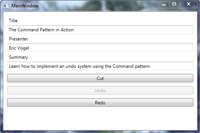
You should now be able to run the completed application and be able to enter a presentation then undo the cut and redo the cut. The Undo button should only be enabled after a Cut operation is performed. The Redo button should only be enabled after an Undo is performed. The complete application is shown in Figure 1.
[Click on image for larger view.] |
| Figure 1. The completed application. |
The Command Pattern is good for encapsulating GUI actions and implementing a generic undo system. It's a very useful pattern to know because of its widespread applications. Most of all, the Command Pattern helps you keep your code clean and easier to maintain.
About the Author
Eric Vogel is a Senior Software Developer for Red Cedar Solutions Group in Okemos, Michigan. He is the president of the Greater Lansing User Group for .NET. Eric enjoys learning about software architecture and craftsmanship, and is always looking for ways to create more robust and testable applications. Contact him at [email protected].