News
New Visual Studio App Center Serves as 'Mission Control' for Mobile Apps
After a public preview, Microsoft has renamed and officially launched its "mission control" service for mobile apps, now called Visual Studio App Center.
Visual Studio App Center was debuted as a public preview at last year's Connect conference as Visual Studio Mobile Center and -- in reaction to developer feedback -- was subsequently expanded to support apps across the mobile and desktop spaces and launched this month under its new name. It now targets macOS and Windows apps in addition to iOS and Android.
Microsoft said the service is designed to help mobile developers issue releases more frequently with higher quality while letting them spend more time on coding features rather than managing overhead.
App Center is provided via a Web-based portal that can be accessed by anyone with GitHub or Microsoft account credentials. In addition to the portal, a command-line interface (CLI) is provided (code on GitHub) along with a REST API.
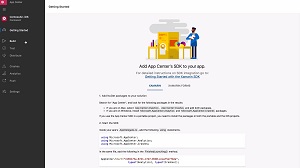 [Click on image for larger, animated GIF.] App Center in Animated Action (source: Microsoft).
"App Center has everything you need to manage the lifecycle of your apps, including automated builds, testing on real devices in the cloud, distribution to beta testers and app stores, and monitoring of real-world usage through crash and analytics data," Microsoft's Keith Ballinger said in a blog post earlier this month. "Apps written in Objective-C, Swift, Java, C#, Xamarin, and React Native are supported across all features."
Those features include:
- Build: Developers can build Android, iOS, macOS and Windows apps in the cloud without the need to maintain their own server.
- Test: Automated UI tests of iOS and Android apps are available to run on hundreds of configurations and thousands of real devices, supporting testing frameworks such as XCUITest, Espresso, Appium, and Xamarin UITest.
- Distribute: Leveraging HockeyApp functionality, developers can use App Center to target distributions to specific groups, including: beta testers or other explicit audiences; Google Play and Apple's App Store; or Microsoft Intune.
- Analytics: A dashboard provides a world map with audience insights such as active users, popular device models and activity. Developers can dive into the details of custom events and associated data, monitor real-time usage and automatically export data to Azure Application Insights and Azure Blob storage for further reporting and historical analysis.
- Crashes: Crash reports are provided throughout the lifecycle of an app, letting developers monitor the health of apps using full symbolication for faster debugging, grouped by severity to aid in triage.
- Push: Customers can be engaged through the use of push notifications. Developers can leverage analytics data to create audiences based on factors such as geography, language, carrier, and device properties, and then send these groups relevant push notifications.
As far as pricing, the Distribute, Analytics and Crash services are free, while Test is available in a 30-day free trial. Build and Push come in free tiers in addition to paid plans in which developers pay for what they use, with no specific provided.
With App Center now generally available, Microsoft provided a roadmap of features the App Center team will be working on over the next three to six months.
A May hands-on tutorial on using App Center (then called Mobile Center) written by Greg Shackles is available here.
About the Author
David Ramel is an editor and writer at Converge 360.