News
Visual Studio 2022 Now Does Automatic Code Cleanup on File Saves
One nifty little feature in the brand-new Visual Studio 2022 17.1 Preview 2 is automatic Code Cleanup on Save.
Code Cleanup was actually introduced way back in 2018 with Visual Studio 2019 Preview 1. It lets developers configure code styles they want to apply by choosing one of two profiles in the Configure Code Cleanup dialog box.
Microsoft documentation from August 2021 says: "For C# code files, Visual Studio 2019 has a Code Cleanup button at the bottom of the editor (keyboard: Ctrl+K, Ctrl+E) to apply code styles from an EditorConfig file or from the Code Style options page. If an .editorconfig file exists for the project, those are the settings that take precedence."
"Code Cleanup On Save" has actually been available for a while also, thanks to a Visual Studio Marketplace extension appropriately called Code Cleanup On Save, authored by Microsoft extension guru Mads Kristensen. "Code Cleanup is a new feature of Visual Studio 2019 that will automatically clean up your code file to make sure it is formatted correctly and that your coding style preferences are applied," the marketplace description says. "This extension will perform the Code Cleanup automatically when the file is being saved." It sports more than 30,000 installs and earned a perfect 5 rating from 12 developers who reviewed it.
Now, the functionality is baked into the company's flagship IDE for the first time, though one has to delve into the preview channel to use it right now.
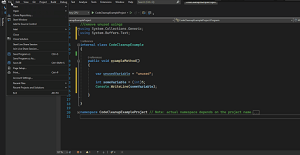 [Click on image for larger, animated GIF view.] Code Cleanup on Save in Animated Action (source: Microsoft).
"Starting in Visual Studio 2022 17.1 Preview 2, developers can now perform Code Cleanup automatically when a file is being saved!" said Microsoft product manager Denizhan Yigitbas in a Jan. 10 blog post. "Code Cleanup automatically on Save is a new feature integrated into Visual Studio 2022 that can clean up your code file to make sure it is formatted correctly and that your coding style preferences are applied. Some customizable preferences include: format document, sort usings, remove unnecessary usings, and more. This feature can help minimize stylistic violations within PRs and more to allow developers to spend less time fixing code not meeting specific standards and more time doing what they do best."
His instructions to use it are:
- Navigate to Analyze > Code Cleanup > Configure Code Cleanup to personalize desirable customizations to your code cleanup profile(s).
- Navigate to Tools > Options > Text Editor > Code Cleanup. Add a check in the "Run Code Cleanup profile on Save." Be sure to select the appropriate profile you want to execute automatically whenever you save!
In comments to the post, it was revealed that Code Cleanup on Save doesn't work with C++ yet, so a Developer Community feedback item was just created today (Jan. 11), appropriately called Code Cleanup Support for C++.
Another developer also chimed in: "Indeed, waiting for the c++ support here .... In fact, just including 'Format document' support will get you most of the way there. Though I wouldn't mind some clang-tidy fixes too (it seems like the tooling api from msvc itself won't happen so have to stick with clang toolsets for now)."
Yet another comment said: "This is a nice feature but it's unclear+confusing how Code Cleanup interacts with EditorConfig."
The reply was: "We are currently working on making this experience better which you can track here," pointing to a GitHub issue appropriately titled Easy code cleanup with EditorConfig #40163.
Or you could just look at existing documentation appropriately titled Code styles in EditorConfig files.
About the Author
David Ramel is an editor and writer at Converge 360.