News
Python in Visual Studio Code Enhances Debugging
The December 2023 update to Python in Visual Studio Code introduces several new features, including configurable debugging options that are now available on the Run button menu.
Microsoft's dev team for Python functionality in VS Code maintains the Python, Pylance and Jupyter extensions, which happen to be the three most popular tools in the code editor's marketplace, accounting for some 258 million installs.
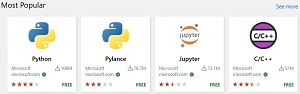 [Click on image for larger view.] Most Popular VS Code Extensions (source: VS Code Marketplace).
Along with those tools is the Python Debugger extension provided as an optional installation, and this is where the configurable debug options under the Run button menu are now available.
"When you select Python Debugger: Debug using launch.json and there is an existing launch.json in your workspace, it shows all available debug configurations you can pick to start the debugger. In the case you do not have an existing launch.json, you will be prompted to select a debug configuration template to create a launch.json file for your Python application, and then can run your application using this configuration," Microsoft said in a Dec. 7 announcement. That's illustrated in this animated GIF:
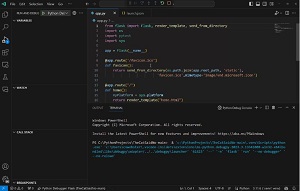 [Click on image for larger view.] Configurable Debugging Options in Action (source: Microsoft).
Other tweaks in the new update include the ability to show type hierarchy when using the Pylance tool, which serves as the language server for VS Code, providing all the Python-specific functionality. The new ability to more conveniently explore and navigate through a Python projects’ types relationships can be helpful when working with large codebases with complex type relationships, Microsoft said.
The update also includes an experimental feature that introduces a new activation mechanism that can activate a selected environment in a developer's default terminal without requiring any explicit activation commands.
In response to community feedback, the dev team also added support for the deactivate command when the selected default terminal is PowerShell or the Command Prompt, with support for more terminals planned.
The other main feature highlighted by the team concerns the Python REPL, standing for Read, Evaluate, Print, and Loop. It's where developers can try out different code constructs to immediately see the effect of changes.
"When attempting to use Smart Send via kbstyle(Shift+Enter) on a Python file that contains unsupported Python code (e.g., Python 2 source code), there is now a warning message and a setting to deactivate REPL Smart Send," the team said. "Users are also able to change their user and workspace specific behavior for REPL Smart Send via the python.REPL.enableREPLSmartSend setting."
Many other tweaks were made, and they, along with more information about all of the above, can be found in the changelogs for the Python, Jupyter and Pylance extensions.
About the Author
David Ramel is an editor and writer at Converge 360.