News
Devs Can Now Just Say 'Hey Code' to Start Copilot Chat in VS Code
Leveraging new accessibility functionality, a new voice command feature in Visual Studio Code lets devs initiate a session with GithHub Copilot Chat simply by saying "Hey Code."
The GitHub Copilot Chat tool in the VS Code Marketplace is one of the hottest AI tools -- nearing 6.9 million installs -- in the rapidly growing space. It boosts the usefulness of the original "AI pair programmer" GitHub Copilot tool by adding advanced chat tech borne from the groundbreaking ChatGPT project from Microsoft partner OpenAI, which led to today's expanding universe of "Copilot" AI assistants throughout Microsoft's software.
The importance of advancements in natural language processing (NLP) to enhance the tool led GitHub to herald speech as the new "Universal Programming Language" and even declare, "Just as GitHub was founded on Git, today we are re-founded on Copilot" during its November GitHub Universe event.
Microsoft, in announcing VS Code v1.86 (January 2024 update), pointed to a new accessibility.voice.keywordActivation setting, which devs can enable to allow VS Code to listen for the "Hey Code" voice command to start a voice session with Copilot Chat. It explained the voice recognition is computed on the local machine and is never sent to any server.
Available options are:
chatInView: start voice chat from the Chat view
quickChat: start quick voice chat from the Quick Chat control
inlineChat: start voice chat from inline chat in the editor
chatInContext: start voice from inline chat if the focus is in the editor, otherwise voice chat from the Chat view
To see and hear the inlineChat option in use, unmute the following video to hear the "Hey Code, translate to German" command and see the resulting actions:
In addition to the GitHub Copilot Chat extension, developers also need the VS Code Speech tool, now nearing a whopping 15.5 million installs.
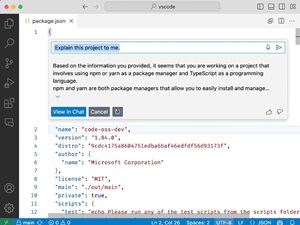 [Click on image for larger, animated GIF view.] 'Explain this code': VS Code Speech Tool in Animated Action (source: Microsoft).
Among several other tweaks enhancing VS Code's AI is an improvement to the VS Code Speech tool that intros new "hold to speak" functionality, in which developers can:
- Press
Cmd+I or Ctrl+I to trigger inline chat
- Hold the keys pressed and notice how voice recording automatically starts
- Release the keys to stop recording and send your request to Copilot
Developers can also now confirm inline chat before saving and try out a preview experiment that provides a lighter UI for the "hold to speak" feature.
Outside of AI, other new features in VS Code v.1.86 include the abilities to:
- Adjust the zoom level for each window independently
- Quickly review diffs across multiple files in the diff editor
- Efficiently debug with breakpoint dependencies
- Use Sticky Scroll in tree views and notebooks
- Enjoy rich paste support for links, video, and audio elements
- Skip Auto Save on errors or save only for specific file types
- Customize commit input and per-language editor settings
- Employ Fine-grained control for disabling notifications per extension
About the Author
David Ramel is an editor and writer at Converge 360.