In-Depth
What a Difference a VS Code Fork Makes: Antigravity, Cursor and Windsurf Compared
Visual Studio Code has become more than an editor. It is now a platform -- and increasingly, a substrate -- on top of which very different visions of AI-assisted development are being built.
Cursor, Windsurf, and Google Antigravity all start from the same foundation: a fork of VS Code, paired with large language models (LLMs) that can generate, modify, and reason about code. Yet hands-on testing shows that the similarities largely end there. Each tool embodies a distinct philosophy about how developers should interact with AI, how much autonomy the AI should have, and where control should reside.
To understand those differences, I began with a concrete comparison: asking each editor to build and iteratively refine the same simple static website using plain HTML and CSS. That exercise, documented in a previous article that didn't compare Antigravity (see "Hands On: Testing Cursor, Windsurf and VS Code on Text-to-Website Generation"), provides a useful baseline. But the more revealing insights emerged after expanding the scope to include Antigravity, a newer entrant that takes a markedly different, agent-oriented approach, and stepping back to examine how each fork approaches planning, execution, and collaboration. Note that Antigravity's debut late last year prompted much discussion (see "Google's Antigravity IDE Sparks Forking Debate").
Visual Ambition vs. Procedural Rigor
The differences become especially visible when the tools are asked to redesign a site visually or propose enhancements. Below are summaries of the three tools, with the visual differences, such as amount of content and professional polish, exemplified in snapshots of the respective Services pages.
Cursor consistently produced the most polished front-end results. Its redesigns introduced modern layouts, realistic imagery, and balanced typography with little friction. When asked to suggest improvements, it generated a pragmatic, production-oriented roadmap and then executed it cleanly when instructed to do so.
 [Click on image for larger view.] Cursor Services Page (source: Ramel).
Windsurf matched Cursor's ambition in scope, proposing and implementing dark mode, animations, expanded navigation, and additional content sections. However, it also introduced workflow complexity. During implementation, Windsurf assumed the presence of a running web server and defaulted to a localhost-based preview that required manually starting a Node.js process. None of the other tools attempted to execute code in this way.
 [Click on image for larger view.] Windsurf Services Page (source: Ramel).
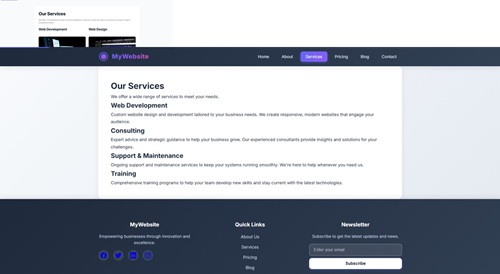
Antigravity, by contrast, delivered a noticeably less polished site. Its pages were simpler, with fewer visual flourishes and no realistic photographic imagery. The focus was on correctness, accessibility, and feature completeness rather than aesthetic impact. Even so, it implemented advanced features such as light/dark mode toggling, mobile navigation, and scroll animations -- just without the visual density seen in the other two tools. Note that, strangely, both Antigravity and Windsurf provided a copyright date of 2024.
 [Click on image for larger view.] Antigravity Services Page (source: Ramel).
For comparison, here's the VS Code Services page created during the original test:
 [Click on image for larger view.] VS Code Services Page (source: Ramel).
See the Sites in Action:
To see live examples of the websites created using each tool, you can visit the following links, thanks to (free) Netlify hosting.
From Prompt Execution to Process Design
At a basic level, all three editors can respond to natural-language prompts by generating working code. Creating a four-page static site with navigation, styling, and accessibility enhancements is no longer remarkable. What differentiates these tools is not whether they can do that, but how they organize the work.
Because much of the functionality of Cursor and Windsurf was documented in the original article, I'll focus here on some Antigravity things.
Cursor and Windsurf behave most like accelerated pair programmers. You issue a prompt, they respond with code changes, and you iterate. Plans, if they exist, are implicit -- embedded in chat responses or inferred from the resulting diffs.
Antigravity takes a different approach. Before writing significant code, it generates explicit planning artifacts, including walkthrough.md implementation_plan.md and task.md, outlining what it intends to do and how it will verify success.
Here's the task.md file that documented all the steps checked off in its plan:
 Antigravity Task.md File (source: Ramel).
While Antigravity generates formal planning artifacts such as implementation_plan.md and task.md, its execution was not consistently gated by explicit approval; after a prompt to suggest improvements, it moved directly into implementation without being instructed to do so. As helpful as it tries to be, it sometimes gets ahead of itself. Read more about that below.
Artifact-Centered Collaboration
Antigravity also introduces a concept that neither Cursor nor Windsurf currently offers: commentable artifacts. Plans and walkthrough documents can be annotated directly, with comments treated as instructions to the agent.
Those comments do not modify files automatically. Instead, they provide structured, document-level feedback that the agent uses to revise its plans or execution. The closest analogue is a pull request review, except the "developer" responding to comments is an AI agent rather than a human.
It worked by popping up a little comment icon when I hovered over part of the file in the editor. Hovering over that icon displayed this message: "Comment on this line."
When I asked Antigravity about that artifact-commenting functionality, it said:
The "comment on artifacts" functionality is a collaboration feature designed to help us work together. It is not just for your personal notes -- it is a direct way for you to communicate with me about a specific file.
Here is how it works:
Feedback Loop: When you add a comment to an artifact (like Implementation Plan), that comment is sent back to me as a message.
Context: It tells me exactly which file you are referring to, so I know your feedback is specific to that document.
Actionable: I read your comments and use them to adjust my plan or code. For example, if you comment "Change the blue to red" on a plan, I will see that and update the plan or implementation accordingly.
No Auto-Injection: Your comments do not automatically write text into the file itself. They are instructions for me. If you want the file changed, I will make the edits based on your comment.
In short, it's the best way to give me specific feedback on the plans and documents I create for you!
Cursor and Windsurf lack this intermediary layer. Feedback is provided through chat prompts in part by rejecting or accepting proposed changes. That makes them faster for exploratory work, but less deliberate when tasks grow more complex.
When I asked Antigravity if other comparable tools had this feature, it replied:
This specific implementation—where you comment on a "living" plan or document to steer an AI agent—is largely specific to Antigravity and the emerging class of "Agentic" IDEs.
Here is how it compares to other tools you might know:
Standard IDEs (VS Code, IntelliJ):
They don't have this native "artifact" concept.
Comments are usually just text in your code files (e.g., // TODO: fix this) or part of a version control system (like Git commit messages).
They don't inherently "talk" to an AI to trigger an action.
GitHub / GitLab (Pull Requests):
This is the closest analogy. You comment on a specific line of code, and a human developer reads it and fixes it.
Antigravity mimics this "Review & Refine" workflow but applies it to an AI agent instead of a human peer.
Chatbots (ChatGPT, Claude):
You can "comment" by replying in the chat, but it's unstructured. You have to say, "In the second paragraph of the plan you just wrote..."
Antigravity's approach is structured: you pin your feedback to a specific document, making it much easier for the agent to understand exactly what you want changed.
In summary: While "commenting" is a universal feature, using it as a control mechanism to collaborate with an autonomous AI agent is a specialized feature of this environment.
Autonomy, Assumptions, and Boundaries
As noted, one of the more revealing moments came when Antigravity was asked to suggest improvements. Rather than stopping at a list of recommendations like the others did, it proceeded to implement them immediately -- adding JavaScript, modifying CSS, and expanding functionality beyond the original request.
When corrected, Antigravity acknowledged the misunderstanding and explained its reasoning, noting that it had interpreted the suggestion prompt as implicit approval to act. That behavior highlights both its agentic ambitions and its current limitations in interpreting user intent.
Windsurf exhibited a different kind of assumption: that it could rely on runtime execution and server-based previews. Cursor, meanwhile, avoided both extremes, executing changes decisively but remaining within the bounds of static file generation unless explicitly instructed otherwise.
All the models shared their "thinking" in the chat window, with Antigravity quick to note when it it encountered problems, with multiple messages pointing to whitespace as the cause:
Refining CSS Updates
I've hit a snag with the CSS update; a straight replace_file_content failed due to minor discrepancies, probably whitespace variations.
Addressing Content Inconsistencies
I'm hitting a snag with replace_file_content. The target isn't perfectly aligning, possibly from slight whitespace variations.
Other functionality unique to Antigravity was how it chose to preview the generated site.
The underlying files were still standard static HTML and CSS, and the site could be viewed normally by opening index.html, but Antigravity defaulted to an extension-based preview path rather than the simpler file-based approach used by Cursor, Windsurf, and VS Code. After the initial prompt, it presented a highlighted Setup button asking to use the browser to open index.html to verify rendering. When pressed, it launched an "onboarding" page running on localhost to install a Chrome extension.
Browser Setup
Preview
Bring the Antigravity agent into your browser to see and interact with websites. It empowers the agent to test features, intelligently monitor dashboards, and seamlessly handle routine browser tasks. Install the extension to get started.
Once the extension was installed, the generated site opened in Chrome.
While Windsurf implemented a similarly expansive feature set, including dark mode, animations, additional pages, and interactive elements, it tried a localhost-based preview that did not initially work, as noted above. Running the site with full functionality on localhost required manually starting a Node.js server by opening the terminal and pasting in cd "C:\Users\dramel\CascadeProjects\simple-website" node server.js. Once running, the implemented features behaved as described. Windsurf churned away at this problem for a while, seeming to run in circles until I finally realized I had to do that manual step.
Model Choice and Transparency
Another divergence lies in how much each tool reveals about the models powering it. The discussion below is from my experience only, which might be as flawed as AI outputs can be.
Antigravity was the most transparent, defaulting to Gemini 3 Pro (High) while exposing multiple alternatives, including Claude Sonnet 4.5, Claude Opus 4.5 (Thinking), and GPT-OSS 120B. It also offered distinct conversation modes, such as planning-focused and fast execution modes.
Windsurf, by comparison, exposed SWE-1.5 as a default, with a web search indicating it was free through March 2026. Other options included GTP-5.2 Low Reasoning, GPT-5 Medium Reasoning, GPT-5 Medium Reasoning Fast and GPT-5.2-CodexLow Fast. Cursor did not disclose its model choice during testing because I quickly bumped into a usage limit though I did the same amount of work as I did in Windsurf, which is still running strong, and VS Code offered the widest range of models, but that was with my paid subscription.
Here's a Gemini-produced table of comparisons across the three tools, though I'm pretty sure it's not limited to the free versions of each tool:
Comparison of AI-Native IDEs (2026)
| Feature |
Cursor |
Windsurf (Codeium) |
Google Antigravity |
| Core Philosophy |
Developer Flow: AI as a high-speed copilot that enhances manual coding. |
Context Specialist: AI as an architect that understands complex project dependencies. |
Agent-First: AI as a team of autonomous agents that you manage. |
| Primary Interaction |
Tab-to-complete, Composer (multi-file), and Chat. |
"Cascade" (multi-file reasoning) and "Supercomplete." |
"Agent Manager" view and "Mission Control" dashboard. |
| Autonomy Level |
Medium (Human-in-the-loop for most edits). |
High (Independent context gathering and multi-file execution). |
Very High (Parallel agents working on different tasks/workspaces). |
| Best Use Case |
Solo devs and fast iteration on web/Python projects. |
Large enterprise monorepos and multi-module architectures. |
Complex, parallel workstreams and "hands-off" task delegation. |
| Model Focus |
Multi-model (Claude 4.5, GPT-OSS-120B, etc.). |
Model-agnostic; focuses on proprietary context/RAG logic. |
Gemini-native (Gemini 3 Pro/Flash) with 2M+ token context. |
Here's a Gemini-produced pricing summary of the three tools:
Comparison of AI-Native IDE Pricing (January 2026)
| Plan Tier |
Cursor |
Windsurf (OpenAI/Codeium) |
Google Antigravity |
| Free / Hobby |
$0: 2,000 completions + 50 slow requests/mo. |
$0: 25 prompt credits/mo (approx. 100 GPT-4.1 prompts). |
$0: Public preview with generous weekly rate limits. |
| Pro / Individual |
$20/mo: 500 fast requests + unlimited slow requests. |
$15/mo: 500 prompt credits + unlimited SWE-1.5 usage. |
Included: Bundled with Google AI Pro (Gemini Advanced) subscription. |
| High-Volume |
$200/mo (Ultra): 20x usage on OpenAI, Claude, and Gemini models. |
N/A: Primarily uses credit add-ons ($10 per 250 credits). |
TBA: Higher-tier limits expected via Workspace AI Ultra plans. |
| Business / Team |
$40/user/mo: Admin controls, SSO, and usage analytics. |
$30/user/mo: Pooled credits, Zero Data Retention (ZDR), and admin dash. |
Workspace: Managed via Google Workspace enterprise tiers. |
| Model Access |
Claude 4.5, GPT-OSS, Gemini 3 Pro. |
GPT-5.2 (Native), SWE-1.5, Claude, Gemini. |
Gemini 3 Pro/Flash (Native), Claude 4.5, gpt-oss-120b. |
I'm not sure about the pricing/tier information, especially concerning Cursor and Windsurf, because I used the latter much more extensively than the former during testing yet didn't hit any limits. Cursor, on the other hand, hit a usage limit quickly despite doing about the same amount of work as I did in Windsurf, which is still working today. Cursor didn't explain what usage limit I hit, or if it would be reset after a a certain period of time, it just presented a button to upgrade to Pro. VS Code offered the widest range of models, but that was with my paid subscription to GitHub Copilot.
Final Thoughts
Taken together, these tools illustrate how far VS Code forks can diverge even when built on the same foundation.
Cursor prioritizes speed, polish, and production-ready output. Windsurf pushes toward more dynamic behavior, sometimes assuming a level of autonomy it cannot yet fully execute. Antigravity emphasizes planning, review, and process transparency, even at the expense of visual refinement.
None of these approaches is inherently superior. But they point to different futures for AI-assisted development -- from fast-moving copilots to methodical agents that resemble junior engineers following a design document. As these tools mature, the choice may hinge less on raw generation quality and more on how much structure, autonomy, and predictability developers want from the AI sitting inside their editor.