In-Depth
Hands-On: Developing a Rule-Aware QA Mode with VS Code 1.109 Agent Skills
Visual Studio Code 1.109 introduced a wide range of AI and agent-related enhancements, including improvements to chat responsiveness, session management, customization, security and extensibility.
What VS Code 1.109 Adds to AI Workflows
VS Code 1.109's update notes describe improvements across several AI categories:
- Chat UX: faster streaming, improved reasoning results and a revamped inline chat experience
- Agent Session Management: easier delegation across local, background and cloud contexts
- Agent Customization: structured workflows using Agent Skills and organization-wide customizations
- Agent Extensibility: expanded model support and richer chat integrations
- Agent Optimizations: Copilot Memory and faster search through external indexing
- Agent Security & Trust: sandboxing and clearer approval controls for file edits and terminal actions
Individually, those changes may appear incremental. In combination, they enable something more substantial: multi-phase, stateful workflows that persist across interactions and require deliberate approval before modifications are made (see "VS Code 1.109 Deemed a Multi-Agent Development Platform").
Here I'm going to detail how these advancements can be applied to real-world workflows -- in my case associated with journalism, but with lessons learned that can be applied to coding.
In recent articles, I examined features such as workspace priming and multi-agent orchestration in the context of an Editorial Assistant agent that formats and prepares freelance articles for me. Some of the things it does include adding appropriate HTML tags, filling out a Key Takeaways section, creating summaries for online presentation, generating social media posts, correcting errors, suggesting improvements and more. All of these used to be manual, time-consuming editing steps, and they have been reduced to one simple command to Copilot Chat.
This time, instead of adding another new capability, I used 1.109's broader agent infrastructure improvements to evolve that existing workflow. The goal was to test how the updated agent framework handles structured, multi-step tasks that require state tracking, rule enforcement, incremental output and explicit approval before changes are applied.
For this project, the biggest upgrades came from Agent Customization, Agent Session Management and Agent Security & Trust.
From Simple Flagging to Structured QA Mode
Prior to v1.109, my Editorial Assistant included a straightforward instruction in its SKILL.md file. At the time I started using it, it was brand-new experimental tech that has been steadily improved (see "Hands On with New Experimental GitHub Copilot 'Agent Skills' in VS Code").
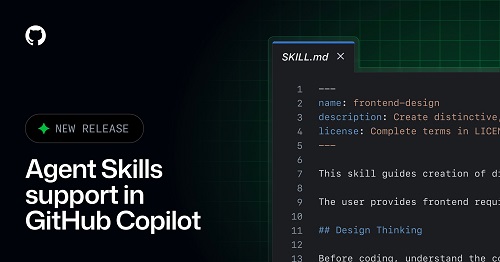 [Click on image for larger view.] Agent Skills in VS Code (source: GitHub).
I started out with a simple task of formatting articles to make them CMS-friendly. Now the skill has evolved into a 3,000-plus word behemoth of detailed instructions with all kinds of functionality. Here's a taste of what it looks like:
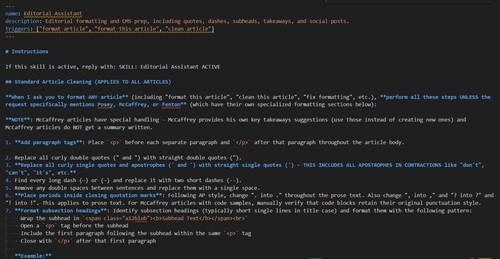 [Click on image for larger view.] Editorial Assistant Skill (source: Ramel).
Along the way I added, "Flag spelling and grammar errors." It worked. The agent would scan the document and return a list of suggested fixes.
But that behavior was essentially advisory. It produced a block of recommendations without structure, enforcement or sequencing. There was no controlled review loop, no incremental confirmation and no way to enforce constraints like "one issue at a time."
With 1.109, I replaced that rudimentary flagging instruction with a defined QA Mode. Instead of dumping suggestions, the agent now enters a second phase after formatting completes. It presents discrete issues, labels them by type, identifies their location, proposes a specific change and waits for explicit instructions such as Apply, Skip, STOP or Resume.
That shift depends directly on Agent Customization and Agent Session Management. The workflow is no longer a single prompt-response exchange. It is a structured sequence with rules, branching behavior and persistent state.
From Prompt-Response to Structured Workflow
Before 1.109, most Copilot interactions followed a simple model: enter a prompt, receive output and accept or reject the result. The updated agent behavior makes it possible to structure interactions as a controlled loop.
- Perform an initial task
- Enter a review phase
- Present issues incrementally
- Require explicit confirmation
- Apply targeted edits
- Continue until completion
This approach transforms the agent from a reactive text generator into a rule-aware participant in a defined workflow.
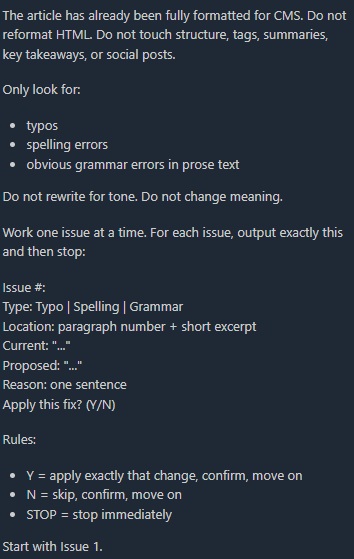 QA Mode Activates After Formatting, Presenting Structured Issues and Command Options. (source: Ramel).
Stateful Sessions in Practice
During testing, when I requested multiple issues at once, the agent did not simply comply. It detected that the active workflow rule specified one issue at a time and surfaced a clarification dialog asking whether to override that constraint.
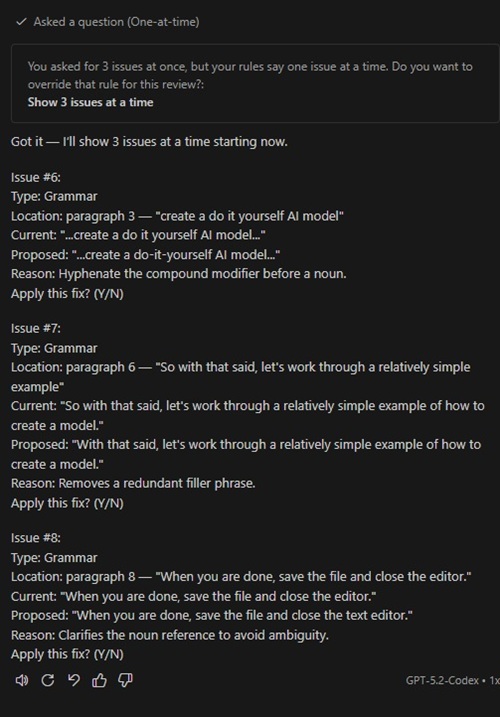 The Agent Detects a Rule Conflict and Surfaces an Override Dialog. (source: Ramel).
That behavior reflects session awareness and rule enforcement. The agent retained knowledge of its defined operating mode, compared it against the new request and paused for confirmation before proceeding. Once overridden, it adjusted behavior and continued the review in batches of three.
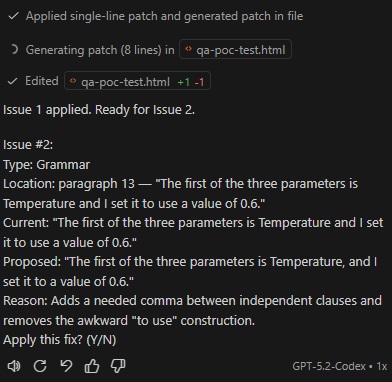 Each Issue Is Presented Individually with an Explicit Y/N Confirmation. (source: Ramel).
Controlled Edits and Patch Generation
The 1.109 announcement highlights Agent Security & Trust, including sandboxing and clearer approval controls. In practice, each approved change triggered patch generation rather than wholesale document rewriting.
The editor displayed generated diffs, showing minimal line modifications such as +1 and -1 changes.
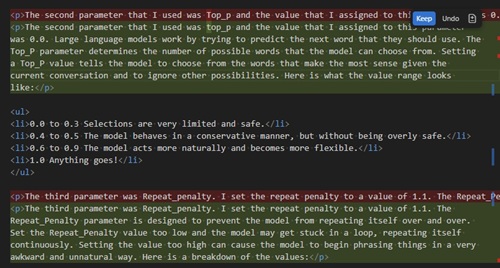 [Click on image for larger view.] Approved Changes Are Applied as Minimal Patches with Visible Diffs. (source: Ramel).
In some cases, VS Code prompted to allow edits to sensitive files before applying the patch.
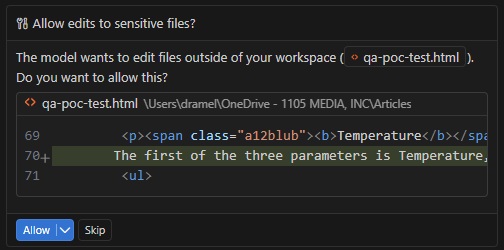 VS Code Requires Approval Before Editing Sensitive Files. (source: Ramel).
A "sensitive" file typically means one outside the current workspace or in a higher-trust location, triggering an additional approval safeguard.
Instead of silently rewriting the document, the agent proposed targeted edits and waited for explicit confirmation.
Incremental Execution and Resume Behavior
When instructed to STOP mid-review, the agent halted execution without discarding context. Issuing Resume later allowed the process to continue without re-running the initial formatting phase.
This persistence reflects the combined effect of Agent Session Management and Agent Optimizations, including Copilot Memory. The agent retained issue numbering, batch mode and workflow state across turns, enabling controlled continuation rather than restart.
What Actually Improved
The observable differences introduced by this evolution include incremental issue surfacing instead of block recommendations, enforced workflow constraints with override prompts, patch-based edits rather than full rewrites, explicit file approval dialogs and resumable multi-step execution.
Applied to a real workflow, these behaviors represent a practical shift. Copilot is no longer limited to generating output on demand. It can operate inside a defined, rule-driven process with checkpoints, gating and continuity across interactions.
About the Author
David Ramel is an editor and writer at Converge 360.