In-Depth
Can OpenClaw Challenge Copilot in VS Code?
With all of the buzz around OpenClaw, the new open-source agentic AI project, I have been experimenting with it in a series of hands-on proof-of-concept articles to see how it might be used with Visual Studio Code, which I thought would be of interest to readers of Visual Studio Magazine. So far, I have found the VS Code usage nascent, limited and not yet especially useful.
For those not yet in the know, OpenClaw is an open-source project that provides a local gateway for running AI agents. It is designed to be flexible and extensible, allowing users to create their own agents and integrate them with various tools and platforms. The project has generated excitement because of its potential to broaden access to AI capabilities and enable more personalized and customizable AI experiences. You can learn more about it by clicking on the image below to expand it, wherein the tool explains itself.
Finding the OpenClaw-in-VS-Code story a bit thin in these early stages, I came upon a new -- perhaps novel -- angle: using OpenClaw's localhost dashboard inside VS Code's integrated browser.
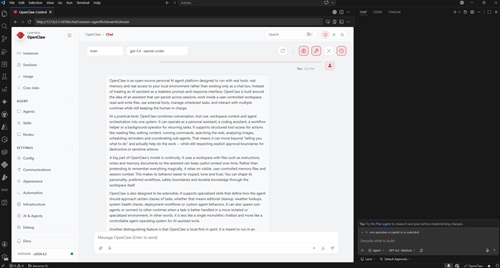 [Click on image for larger view.] OpenClaw in VS Code Integrated Browser (source: Ramel).
So this latest PoC took a different route. Instead of depending on a dedicated extension as the primary interface, I opened the OpenClaw gateway, grabbed the localhost dashboard URL, pasted it into VS Code's integrated browser, used the terminal to retrieve the gateway token, and then ran the web-based OpenClaw experience inside VS Code itself. At the same time, I used Copilot in the editor and gave both tools the same prompts against the same file: my SKILL.md document used to format and QA freelance editorial articles.
Both the OpenClaw dashboard and Copilot were backed by GPT-5.4-class models, though not necessarily under identical conditions. A probe of my local OpenClaw setup showed its default model was openai-codex/gpt-5.4, authenticated through my [email protected] OpenAI Codex profile rather than my GitHub Copilot subscription. So this was not a simple "free OpenClaw versus paid Copilot" comparison, but rather a comparison of two different product experiences built around the same general model family.
An Unusually Direct In-Editor Comparison
What made the setup notable was not just that both tools were available in VS Code, but that OpenClaw was running there through its own local dashboard in the integrated browser rather than through a purpose-built native extension. While this might seem an unusual approach, it avoids context switching and more closely resembles an integrated AI assistant.
I did not find any official documentation or a prominent public walkthrough describing this exact workflow: pasting the OpenClaw localhost dashboard URL into VS Code's integrated browser and using it there as a practical in-editor OpenClaw surface. This approach appears at least lightly charted, if not entirely new.
That detail matters because the experiment was not just "OpenClaw versus Copilot." It was also a small demonstration that one way around the still-maturing extension ecosystem may be to rely on the browser-based OpenClaw interface while keeping everything inside the editor.
As noted, for the comparison I used the same series of prompts: first to locate and examine the file in the workspace, then to summarize it, and finally to suggest improvements. That initial step also exposed an important difference in how the two tools operated. I had to direct OpenClaw more explicitly to the right folder and file, while Copilot found it more readily through its native workspace integration. The results from there were interesting.
How OpenClaw Summarized the File
For the prompt "open it and summarize what it does," OpenClaw responded in plain language and quickly organized the file into higher-level functional groups. It described SKILL.md as an article-formatting skill for editorial cleanup and CMS prep, then broke that down into house-style cleanup, paragraph wrapping, CMS-specific subheads, HTML list conversion, anchor-tag creation, figure markup, summary and takeaway generation, social post creation, and QA review. It also called out specialized author-specific workflows and highlighted operational details like the instruction to reply with "SKILL: Editorial Assistant ACTIVE" when the skill is engaged.
The notable thing about OpenClaw's summary was not that it merely listed tasks. It abstracted the file into a workflow system. It gave a broad view of what the skill is for, what phases it contains, and how the author-specific logic changes the baseline behavior.
How Copilot Summarized the File
Copilot's answer covered much of the same territory, but with a different posture. It first stated that it was opening the file and reading its contents, then described the document as a formatting-and-QA skill for HTML article production. It summarized punctuation cleanup, paragraph tags, subheads, HTML list conversion, anchor-tag handling, figure insertion, summary and key takeaway generation, appended X and LinkedIn posts, and a separate QA mode with explicit approval commands. It also described the author-specific workflows in a useful and structured way.
OpenClaw's summary was too long to capture in a screenshot and I don't want to over-lengthen this article with the whole thing, but here is the very first part, just to give you a taste of the style:
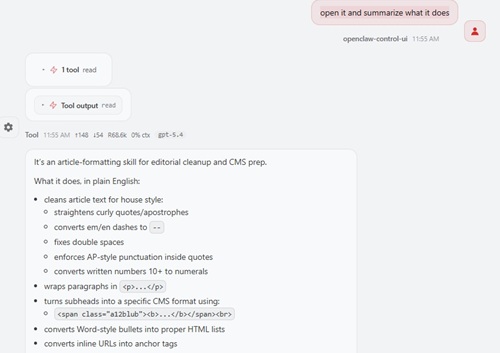 [Click on image for larger view.] OpenClaw Summary (source: Ramel).
Here is Copilot's more succinct summary:
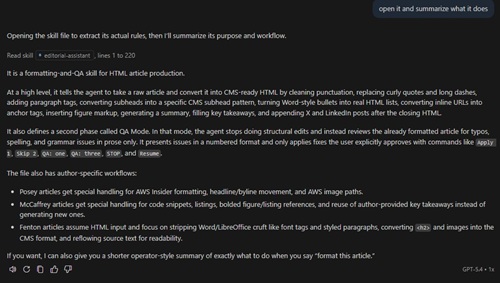 [Click on image for larger view.] Copilot Summary (source: Ramel).
So the difference was not that one tool understood the file and the other did not. Both did. The difference was that OpenClaw summarized the file as a coherent editorial system, while Copilot summarized it more as a defined set of instructions and phases. OpenClaw felt more synthetic. Copilot felt more procedural.
How OpenClaw Suggested Improvements
The gap widened when I asked both tools to suggest improvements.
OpenClaw's response was broad and architectural. It argued that the file was trying to do too much and should be split into smaller skills covering cleanup, QA, and author-specific workflows. It flagged conflicting instructions, recommended clarifying activation precedence, and suggested separating formatting from editorial generation. It wanted tighter QA boundaries, stronger safety rules around code and HTML, a shared base cleanup pass to replace repeated rules, cleaner examples, explicit image path logic, an output contract, optional skip flags, and a more deterministic execution order.
In short, OpenClaw critiqued the file the way a design reviewer might critique an overgrown software system. It saw coupling, ambiguity, duplicated logic, and scope creep. Its closing judgment captured that tone: the skill had a strong editorial brain, but it was trying to be a whole mini-application inside one markdown file. (And hey, in my defense, this monstrosity was constructed over time in many iterations and was written entirely by my ChatGPT assistant -- probably using GPT-5.4 anyway -- so these things are basically almost critiquing themselves.)
Again, OpenClaw's response was too long to capture or list in its entirety, but here is the first part of it to give you a sense of the style:
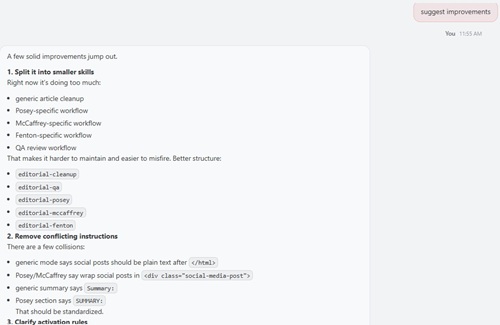 [Click on image for larger view.] OpenClaw Suggestions (source: Ramel).
How Copilot Suggested Improvements
Copilot's critique was more compact and more maintenance-oriented. It focused first on consistency, pointing out conflicting instructions for X post length, LinkedIn length, and whether social posts should be plain text or wrapped in HTML. It noted that some sections treat those outputs one way while Posey and McCaffrey use a different pattern, and it said that should be normalized unless the variation is intentional.
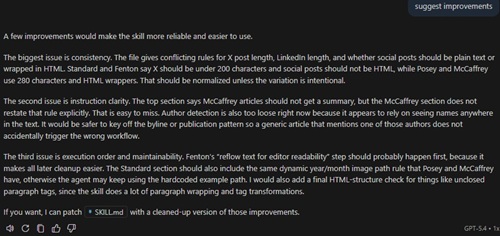 [Click on image for larger view.] Copilot Suggestions (source: Ramel).
It then moved to instruction clarity. Copilot noted that the top section says McCaffrey articles should not receive a summary, but the McCaffrey-specific section does not restate that rule, making it easy to miss. It also said author detection appeared too loose because it might be triggered by seeing names anywhere in the text, and suggested keying that logic off the byline or publication pattern instead.
Finally, it addressed execution order and maintainability. It suggested moving Fenton's text-reflow step earlier so later cleanup becomes easier, adding the same dynamic year/month image-path rule to the Standard section that other sections already have, and finishing with an HTML-structure check for problems such as unclosed paragraph tags.
Copilot's answer was less sweeping, but it was practical. It stayed focused on contradictions, hidden assumptions, and sequencing problems that could be tightened without redesigning the whole file.
Why the Responses May Have Diverged
The side-by-side comparison suggested that the tools were doing more than merely producing random variations from the same prompt. OpenClaw consistently behaved more like a system designer, willing to infer larger structural problems and recommend bigger changes. Copilot behaved more like a careful maintainer, staying closer to the file's current shape and proposing narrower fixes to make it safer and more coherent.
One clue is that OpenClaw specifically identified its model as openai-codex/gpt-5.4. That could help explain some of the difference. Even within the same general model family, different product wrappers, model profiles, hidden instructions, tool wiring, and response policies can produce noticeably different output. So while ordinary model variability always plays some role, the more plausible explanation here is a combination of product-level orchestration and model-profile differences rather than randomness alone.
That also means this comparison should not be reduced to a simplistic "same model, different luck" explanation. What I likely saw was two tools using GPT-5.4-class capabilities under different operating conditions, with OpenClaw's Codex-labeled profile and Copilot's own orchestration each shaping the style and scope of the results.
Which Tool Came Out Ahead?
For summarization, I would give OpenClaw the edge. It produced the more readable and more conceptually useful description of what the file does. It told the story of the file better.
For improvement suggestions, the answer depends on what kind of help is needed. OpenClaw produced the stronger big-picture critique. If the goal is to rethink how the skill should be organized, its answer was more valuable. Copilot produced the stronger incremental cleanup pass. If the goal is to stabilize the current file without turning it into a redesign project, its answer may be the more immediately actionable one.
That is what made the exercise more interesting than a simple winner-loser comparison. It surfaced two different assistant styles. One pushed toward redesign. The other pushed toward maintenance.
Why the Result Matters
This test was rooted in an editorial file, but the lesson travels well. Whether the artifact is a SKILL.md file, a project README, a YAML pipeline, a linter configuration, or an internal coding standard, users often need an AI assistant to do two things: explain what a file is doing and say how it could be better. This PoC showed that OpenClaw and Copilot can arrive at very different answers to those same questions, even when they appear to be drawing from the same general model family.
It also suggested that there is still room for unconventional OpenClaw workflows in VS Code. The editor's integrated browser turned out to be a usable bridge between the OpenClaw dashboard and the broader VS Code workspace, and I did not find strong public evidence that this exact pattern has already been widely documented. In a tooling landscape that still feels unsettled, that alone made the experiment worth doing.
Those previous articles (including one focused on Visual Studio 2026) are:
About the Author
David Ramel is an editor and writer at Converge 360.