News
Infragistics Puts MCP Toolchain at Center of Ultimate 26.1
Infragistics is positioning Ultimate 26.1 around a new Ignite UI Enterprise MCP toolchain intended to connect AI coding assistants to the company's component libraries, documentation and theming system.
The announcement says the toolchain consists of three integrated AI development tools: Ignite UI Agent Skills, the Ignite UI CLI MCP Server and the Ignite UI Theming MCP Server. Infragistics said the stack is part of Ultimate 26.1 and supports workflows across Angular, React, Web Components and Blazor.
The release connects to AI coding assistants including GitHub Copilot, Cursor, Claude Desktop, Claude Code and JetBrains AI Assistant, according to Infragistics. The company's stated goal is to give those assistants context from Ignite UI's component library, documentation and theming system rather than relying only on general model training data.
Three-Part MCP Toolchain
Infragistics describes the AI-assisted app development toolchain as a system for giving developers and AI agents a shared playbook. Ignite UI provides Agent Skills and an MCP server so agents can generate UI inside existing tools with component, API and design-system context.
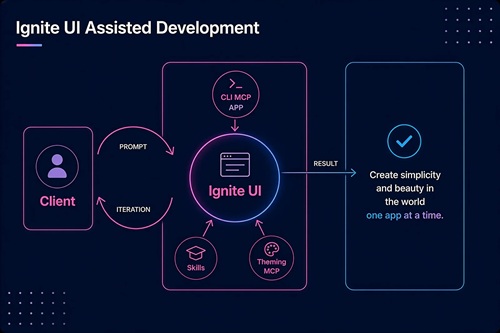 [Click on image for larger view.] Ignite UI-Assisted Development (source: Infragistics).
Agent Skills are structured markdown files that load into an AI assistant's context. The skills teach assistants such as GitHub Copilot, Cursor, Windsurf, Claude, Gemini CLI and JetBrains Junie how to work with Ignite UI for Angular. The documented Angular skills cover components and layout, data grids, and theming and styling.
The Ignite UI CLI MCP Server handles project and component workflows. The server lets AI assistants scaffold projects, modify existing apps, create and update components, and answer documentation questions for Ignite UI for React applications. Infragistics' Ultimate 26.1 post lists six exposed tools: generate_ignite_app, list_components, get_doc, search_docs, search_api and get_api_reference.
The Ignite UI Theming MCP Server is focused on visual design and styling. The server enables AI assistants to generate theming code for Ignite UI applications, including palettes, typography, elevations, component design token overrides and CSS custom properties. The documentation says the server works with Ignite UI component libraries from Infragistics, with tooling to detect the project framework and select import paths and selectors.
Workflow Focus: Build, Modernize and Theme
The announcement frames the MCP toolchain around five AI-assisted workflows. Developers can describe an application and have the toolchain create project structure, routing and Ignite UI component wiring. Ignite UI Agent Skills include a generate-from-image capability for Angular, React, Blazor and Web Components that can use a screenshot, mockup or wireframe to create a working view.
For existing applications, teams can use Ignite UI CLI scaffolding tools and component documentation through the AI workflow to identify replacement components and generate import paths, API usage and configuration patterns. Developers can access component documentation in real time and use the Theming MCP Server to generate palettes, design tokens, typography, elevations and component themes for Angular, React, Web Components and Blazor.
Ultimate 26.1 adds implementation details for enterprise environments, with the company saying the CLI MCP server has a remote mode that proxies queries to a live docs backend and a local mode that uses a bundled SQLite database with FTS4 full-text search. Infragistics describes the local mode as offline capable and suitable for corporate networks where outbound access to documentation backends is restricted.
With MCP running locally, data does not leave the user's environment when connected to a local LLM. That claim is specific to the local-MCP/local-LLM scenario described by Infragistics.
Related AI Features and Services
Beyond the three main toolchain parts, Infragistics' Ultimate 26.1 post describes AI-ready scaffolding and configuration in Ignite UI CLI 15.0 through 15.3. New Angular, React and Web Components projects created with the CLI include agent instruction files and MCP configuration, while the ai-config command configures Agent Skills and both MCP servers in existing Angular, React, Web Components or Blazor projects.
The same post identifies MAKER as an optional, experimental multi-agent orchestration MCP server. Infragistics says MAKER decomposes complex tasks into validated step plans using consensus-based voting across multiple AI agents, and exposes plan, execute and plan_and_execute tools. The associated GitHub repository describes MAKER as an AI orchestration framework for consensus-based voting, proactive validation and task decomposition.
Infragistics also links the MCP push to App Builder, its design-to-code tool. The EIN-distributed announcement describes App Builder as a low-code platform that streamlines design-to-code workflows and produces code for Angular, Blazor, Web Components and React. Not documented in the provided sources: whether App Builder itself received a separate new AI feature in Ultimate 26.1.
Ultimate 26.1 Beyond AI
The broader Ultimate 26.1 release also includes Ignite UI Grid Lite, grid performance work, PDF export updates, an Intl-based internationalization engine and new components. The release covers Ignite UI CLI 15.0 through 15.3, Ignite UI Grid Lite, Ignite UI for Angular 21.1 and 21.2, Ignite UI for React 19.5.1, 19.6.0 and 19.7.0, Ignite UI for Web Components 7.0.0, 7.1.0 and 7.2.0, and Ignite UI for Blazor 25.2.77.
Grid Lite is described by Infragistics as a free, MIT-licensed open-source data grid. The first framework-native wrapper, IgxGridLiteComponent for Angular, ships in Ignite UI for Angular 21.1 as a Developer Preview. The release post says React and Blazor wrappers are on the roadmap.
For grids, Infragistics says the H1 2026 releases include scroll-pipeline optimizations across Data Grid, Tree Grid, Hierarchical Grid and Pivot Grid in Angular, React, Web Components and Blazor. The same post reports automatic performance improvements at 100,000 rows, along with PDF export updates across the grid family.
React 19.5.1 now ships AI guidance directly inside the package, according to the announcement, so coding assistants including GitHub Copilot, Cursor, Claude Desktop, Claude Code and JetBrains AI Assistant can recognize and use the library. The announcement also says the React release adds PDF export across React data grids, scroll performance improvements for large data sets and updated multilanguage support.
About the Author
David Ramel is an editor and writer at Converge 360.