News
VS Code 1.130 Expands Agent Host and Review Tools
The latest weekly update to Visual Studio Code centers on AI agent execution and review workflows. The update continues Microsoft's shift toward running coding-agent sessions in a dedicated process, while also adding file-level change statistics, denser diff views, expanded Git worktree support, chat timestamps and improved handling of file links in terminal-based Git output.
The official VS Code 1.130 release notes describe the Agent Host, the preview Agents window and assisted tool approvals as the release's main agent-related changes. Microsoft is gradually rolling out the update to users, although developers can use the Check for Updates command to request it immediately. The company also directs developers who want earlier access to features toward the nightly Visual Studio Code Insiders build.
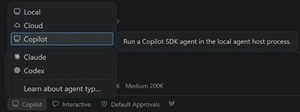 [Click on image for larger view.] Agent Host (source: Microsoft).
Agent Host Becomes the Session Layer
VS Code 1.130 continues Microsoft's work to move agent sessions into the Agent Host, a dedicated process that runs agent harnesses such as Copilot, Claude and Codex. The architecture is based on the Agent Host Protocol, or AHP, and separates the lifetime of an agent session from the VS Code window that displays it. A session running in the host can be connected to and rendered from multiple VS Code windows at the same time.
Microsoft's Agent Host architecture documentation says the host owns agent sessions independently of the clients used to view and control them. The architecture supports shared sessions, remote execution, continued execution without an attached editor window, multiple agent implementations and a dedicated process that is separate from busy extensions. Extensions can continue contributing chat tools, Model Context Protocol servers and custom agents, while the agent runtime operates in the Agent Host process.
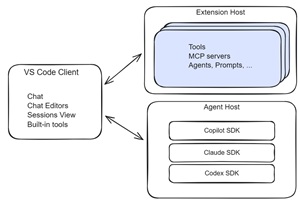 [Click on image for larger view.] Agent Host Architecture (source: Microsoft).
The Agent Host can run as a local utility process or as a standalone server on a remote machine. VS Code uses a message port for local interprocess communication, while remote connections use AHP JSON-RPC over WebSocket. The host runs next to the workspace, meaning that file edits and commands execute on the remote machine when the workspace and host are remote. Developers can also start a standalone host with the code agent host command and expose it through a development tunnel with the --tunnel option.
Agent Host Protocol documentation describes AHP as an agent-agnostic protocol that lets multiple clients share a synchronized view of an agent session. The host maintains the authoritative state and sends an ordered stream of changes to subscribed clients. Clients can reconnect after an interruption and receive either missed actions or a new state snapshot. The protocol documentation says AHP is released under the MIT License.
Microsoft is enabling the Agent Host gradually. Developers who have access can opt in with the chat.agentHost.enabled setting and then choose an available harness from the harness menu. The setting can be controlled at the organization level, which may require an administrator to change it. Microsoft also notes that some agent features may be available only when the selected agent runs through the Agent Host.
Assisted Permissions Evaluate Tool Calls
Version 1.130 introduces assisted tool approvals for agents running on the Agent Host. When the chat.assistedPermissions.enabled setting is enabled, the language model evaluates the risk of each tool call and determines whether the call can run or should be presented to the developer for approval. The Assisted permissions option then appears in the agent permissions picker.
Agents Window Tightens Change Review
The preview Agents window receives several changes for reviewing multi-file edits. Each file header in the Changes editor now displays live insertion and deletion counts beside the file path, giving developers a file-level measure of the size of an agent's changes. The multi-file diff also uses a more compact gutter, aligning file headers, line numbers and controls for unchanged regions while leaving more horizontal space for source code.
The Agents window documentation describes the window as a dedicated agent-focused interface for managing sessions across projects. It includes a sessions list, a customizations panel, a central chat area and a Changes panel for reviewing files and agent-generated edits. The window shares agent sessions, settings and keyboard shortcuts with the main editor window.
Quick chats that run on the Agent Host now appear as compact, single-line rows in the sessions list. Regular project sessions retain a second line that can display change statistics, status information and timestamps. Quick chats are not associated with a workspace, while standard sessions can be targeted at a folder or repository.
Worktree isolation is also expanding beyond the Copilot harness. Claude and Codex sessions that run through the Agent Host can use the New Worktree option in the Agents window. The feature creates a Git worktree for an isolated session, allowing parallel sessions for separate tasks or features within the same workspace. The release notes say the option was previously supported only for the Copilot harness.
The broader Agents window workflow supports opening a multi-file diff, submitting range-based feedback to an agent and marking files as reviewed. After reviewing edits, developers can commit changes made with folder isolation, merge changes from worktree isolation, check out a Copilot Cloud branch or discard edits from the Changes panel.
Chat Adds Timestamps and Credit Visibility
VS Code now displays timestamps for chat requests and responses. Developers can hover over a message toolbar to see the timestamp and elapsed time for an interaction. The behavior can be disabled through the chat.verbose setting.
GitHub Copilot Business and Enterprise users can also view aggregate AI credit usage for the current billing cycle in the Copilot status menu. Previously, VS Code surfaced credit use when a user-level budget was configured. Version 1.130 displays total credits consumed during the billing cycle when no individual budget has been set, giving organization-managed users an in-editor usage total.
Terminal Links Recognize More Git Prefixes
The integrated terminal can now open file links from Git diff output when Git's diff.mnemonicPrefix option is enabled. VS Code recognizes prefixes including i/ for the index and w/ for the working tree, then removes the prefix from the link target before opening the file. It also supports the numeric 1/ and 2/ prefixes generated by git diff --no-index.
The corresponding microsoft/vscode pull request updated the terminal's local-file link parser and its tests. The change generalized the logic used to remove Git diff prefixes so that a terminal link opens the underlying file instead of attempting to locate a path that incorrectly includes the mnemonic prefix.
VS Code Moves to TypeScript 7
Microsoft also changed the toolchain used to build the editor. The VS Code repository is now compiled with the release version of TypeScript 7, and version 1.130 uses the release version of the TypeScript 7 extension.
The separate TypeScript 7.0 announcement says the compiler can perform parsing, type checking and emitting in parallel. It also documents experimental --checkers and --builders flags for configuring parallel type-checking and project-reference builds, along with a --singleThreaded option for disabling parallelism. Those TypeScript capabilities are documented by the TypeScript team; the VS Code release notes do not provide separate performance measurements for the editor's move to the TypeScript 7 toolchain.
About the Author
David Ramel is an editor and writer at Converge 360.