News
Oracle Leans on VS Code for New AI Dev Tooling
Oracle has placed Visual Studio Code at the center of two emerging developer workflows, using Microsoft's cross-platform editor as the workbench for building both enterprise AI agents and Oracle APEX applications.
In separate articles published July 27, Oracle detailed a pro-code experience for Fusion AI Agent Studio CLI and a workflow for developing Oracle APEX applications in VS Code. The offerings address different parts of Oracle's portfolio, but both assume developers will want to work locally with familiar editor features, source-controlled files, command-line tools and AI coding agents.
The two articles do not represent simultaneous product launches. Oracle formally announced the broader AI-native builder experience for Fusion AI Agent Studio on July 14, while Oracle APEX 26.1, including its new APEXlang specification language, became generally available in May. The new guides show how developers can put those capabilities to work from a VS Code environment.
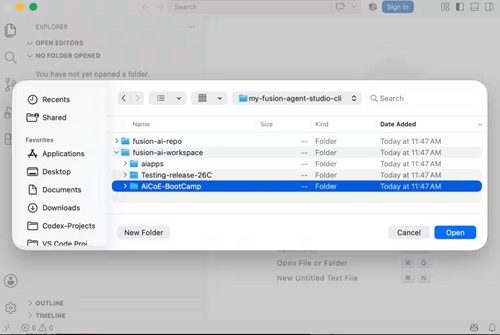 [Click on image for larger view.] Opening Fusion Workspace in VS Code (source: Oracle).
Two Workflows, One Work Surface
The Fusion AI Agent Studio workflow brings development of Oracle Fusion agentic applications into a local workspace. Developers can organize project files in VS Code, interact with Oracle artifacts through the Fusion AI Studio extension, run the aistudio command-line interface and use an AI coding agent to help create or modify the underlying definitions.
The project can contain applications, workflows, agents, business objects, topics, tools, connectors and related resources. Developers can create new artifacts or retrieve existing ones from an AI Agent Studio environment, review the resulting files, test changes and validate the project before publishing it. Oracle positions that local workflow as the pro-code counterpart to the guided and no-code experiences offered through Fusion Applications.
For APEX, the connection starts with APEXlang, the open, declarative specification language introduced in Oracle APEX 26.1. APEXlang represents application components as structured, human-readable files that can be reviewed, versioned and modified by developers or AI coding agents.
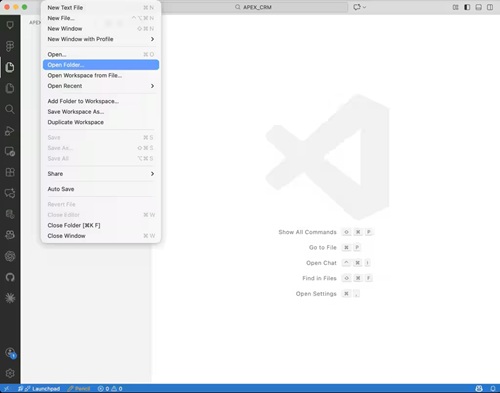 [Click on image for larger view.] Creating an APEX Project Workspace (source: Oracle).
Oracle's setup uses the SQL Developer extension for VS Code to connect to an Oracle Database, browse schemas, execute SQL and import or export APEX applications. Developers can then install APEXlang skills for agents such as Codex or Claude Code, expose Oracle SQLcl as a local tool or Model Context Protocol server, and ask an agent to create or enhance application components while remaining inside the VS Code workspace.
That is a notable shift for a platform historically associated with browser-based, low-code development. Oracle is not abandoning APEX App Builder, but it is adding a file-oriented workflow that looks more like conventional software development: local projects, Git, command-line validation, editor diagnostics and AI-assisted changes reviewed as source.
Three Ways VS Code Spreads
Oracle's approach highlights one form of VS Code's growing influence: vendors can turn the Microsoft editor into a specialized development environment by supplying extensions, command-line tools and project formats. The developer keeps the familiar VS Code shell while the vendor supplies the domain-specific capabilities.
Microsoft's extensibility model is designed for that arrangement. Extensions can add languages, debuggers, views, commands, authentication, source-control integrations, AI agents and other features directly to the VS Code interface, using many of the same application programming interfaces employed by VS Code's own components.
A second path goes deeper. Microsoft develops VS Code in the public Code - OSS repository, whose source is available under the MIT license. Microsoft's Visual Studio Code product is a distribution of that repository with Microsoft-specific additions, but other companies can use Code - OSS as the basis for their own editors.
Cursor provides perhaps the most prominent example from the AI coding boom. The company says it originally forked VS Code because an extension would not give it sufficient control over the editor surface. Posit's data science-focused Positron is similarly built on Code - OSS, adding integrated Python, R, data-exploration and visualization features to the familiar foundation. Devin Desktop, formerly Windsurf, also describes itself as a VS Code-derived environment that retains compatible extensions and workflows.
A third path moves the VS Code experience away from the local desktop. GitHub Codespaces provides a full VS Code development environment through either a browser or the desktop client, while the lightweight github.dev editor brings VS Code-style repository editing directly to GitHub. OpenVSCode Server, meanwhile, packages the upstream editor so organizations and toolmakers can run it remotely and deliver it through a web browser.
From Popular Editor to Compatibility Layer
This ecosystem is supported by an unusually large installed base. Stack Overflow's 2025 Developer Survey described VS Code as the most-used development environment for the fifth consecutive year and the most desired environment among developers who had not yet used it. The survey also found that newer AI editors were attracting interest particularly from developers already using what it called the "industry standard IDE," VS Code.
Microsoft separately reported in May 2025 that Visual Studio and VS Code together had reached 50 million monthly active developers. That combined figure does not disclose VS Code's individual share, but it illustrates the scale of the broader Visual Studio developer-tooling ecosystem.
Popularity alone does not explain why vendors keep choosing VS Code. A vendor adopting it can inherit an editor, terminal, debugger framework, source-control interface, command palette, remote-development architecture and extension model. Just as importantly, developers arrive with existing keyboard habits, settings, themes and expectations about how a modern development environment should behave.
Oracle's two workflows demonstrate the practical result. The company does not have to persuade Fusion or APEX developers to learn an entirely new desktop environment before they can use its latest AI, database and application-development capabilities. It can deliver those capabilities where a large portion of the developer community already works.
About the Author
David Ramel is an editor and writer at Converge 360.