News
GA Release of Visual Studio for Mac 17.3 Intros User Secrets for Sensitive Info
Microsoft this week shipped Visual Studio for Mac 17.3, introducing support for User Secrets among a host of updates.
User Secrets has been an ASP.NET Core thing for years, used by developers to keep sensitive information from going into their source control systems in plain text. It does that through the Secret Manager tool that's used to store sensitive data during the development of ASP.NET Core projects.
Intended as a development tool only, it shouldn't be viewed as a trusted data store, lacking encryption protection, for example.
"The Secret Manager is a recommended practice for storing sensitive information such as API keys, passwords, and database connections during development," said Jon Galloway, senior program manager on .NET Community Team in an Aug. 9 announcement blog post. "The information is stored in a JSON file outside of your project path, so you won't accidentally check the information into a public repository."
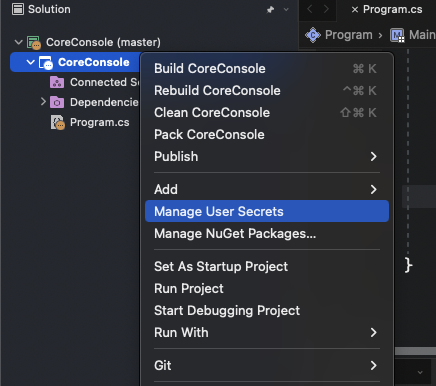 User Secrets Support (source: Microsoft).
The dev team fixed a huge amount of bugs and issues in this release -- including a whopping 46 items reported to Microsoft's Developer Community feedback/feature request site -- but it also added new functionality along with the User Secrets support.
For example, a number of code fixes were enacted, dealing with invalid constraints and a new refactoring that allows developers to switch between top-level statements and the Program.Main style. Another one introduces a new attribute called the StringSyntaxAttribute, which lets developers tell the compiler what kind of data a string represents such as JSON, Regex or DateTime, for examples. Also, the IDE now supports syntax highlighting based on the type of data that the string represents.
The update also introduces initial support for Apple Developer accounts, specifically Individual AppStoreConnect accounts, required for non-enterprise Apple developers.
Yet another tweak updates the Task Window and Regular Expressions dialogs to native UI in order to better integrate with macOS and improved accessibility support. "The Task Window was removed in 17.0 while awaiting the migration to native UI, and we're happy to add it back in this release," Galloway said.
The v17.3 release notes list all the fixes, tweaks and known issues.
With the GA release, as is customary with Microsoft, the dev team also introduced the first preview of the next release, Visual Studio 2022 for Mac v17.4.
A highlight of that preview is preview support for MAUI -- the evolution of Xmarin.Forms that adds desktop app support -- and Xamarin.
"The 17.4 Preview 1 release improves our preview support for .NET Multi-platform App UI, enabling you to build, deploy, and debug .NET MAUI apps on iOS, macOS, and Android," Galloway said. "This release includes XAML Hot Reload support for changing your UI and seeing the changes reflected in your running app."
Remarkably, XAML Hot Reload was introduced to the Windows IDE -- Visual Studio 2019 v16.4 -- way back in December 2019. Development of the Mac IDE has lagged behind that of the Windows IDE by quite a bit. For example, the major release of Visual Studio 2022 for Mac v17.0 finally arrived in May, some six months behind the v17.0 Windows release. (Correction: Microsoft clarified that XAML Hot Reload actually landed in Visual Studio for Mac in v8.4 -- parallel to the v16.4 Windows IDE release -- and that Galloway was only announcing that XAML Hot Reload is now supported for .NET MAUI in the Mac IDE.)
When one developer complained about the lack of minimal support for MAUI on Mac in a comment appended to the announcment post, Galloway responded: "The .NET MAUI tooling is in preview for both Visual Studio for Mac 17.3 and 17.4 Preview 1. In 17.3, there are templates to create .NET MAUI apps, and you can develop and debug applications. I just created and ran a simple MAUI app with 17.3 with no issues, and you can see in the release notes for 17.3 that we fixed several top user-report issues for MAUI. However, the .NET MAUI tool support is better in 17.4, and that's where we'll be releasing the officially supported MAUI tooling. Since you can install 17.3 and 17.4 Preview side-by-side, we're recommending 17.4 Previews for MAUI development."
The v17.4 Preview 1 also adds support for the new scaffolder for ASP.NET Core Minimal APIs, while another tweak now allows for information about DLLs and executables (.exe files) used in an app to be displayed in the new Modules window. More information can be found in the preview release notes.
About the Author
David Ramel is an editor and writer at Converge 360.