News
Visual Studio IntelliCode Preview Offers Instant API Code Examples
The first preview of Visual Studio 2022 17.6 boosts GitHub integration and also sees AI-assisted IntelliCode instantly offering up real-world API code examples -- no more context switching required.
Visual Studio 2022 17.6 Preview 1 shipped this week along with the GA release of VS 2022 v17.5. For that minor-version update, the company touted AI-powered intent-based suggestions. Now, AI is put to further use, addressing the frustration of context switching -- or having to leave the IDE to search for help.
"Now with Visual Studio 17.6 Preview, IntelliCode makes finding real-world code examples for common APIs easier than ever," said Mcrosoft's Peter Groenewegen in a Feb. 22 blog post. "With this feature, you'll have real examples at your fingertips. See how an API has been used in real-world projects. Saving you time and making your coding even more efficient."
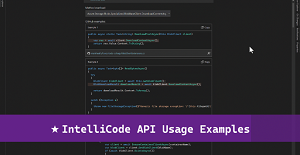 [Click on image for larger, animated GIF view.] API Code Examples in Animated Action (source: Microsoft).
This functionality was provided last year in the open-source-based Visual Studio Code editor via an extension, which has now been installed nearly 10 million times.
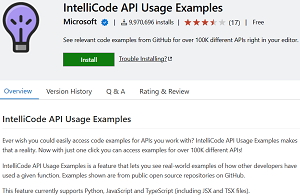 [Click on image for larger view.] VS Code Tool (source: Microsoft).
The examples -- opening up in a new tab upon clicking a hover-generated prompt link -- come from IntelliCode's database, specifically some 100,000 different APIs, as the AI engine was trained on open source repositories on GitHub.
And speaking of GitHub, v17.6 preview 1 also further integrates with that open source code repository/development platform, with similar in-IDE search-and-reference functionality.
"The GitHub Issues integration allows you to search and reference your issues from the commit message box in VS, in response to this suggestion ticket," says the preview 1 release notes. "You can reference an issue or a pull request by typing # or clicking on the # button in the lower right side of the commit message text box. If you weren't already authenticated to access related issues, you will now be prompted to sign in to take advantage of this feature."
This new feature is further explained in a Feb. 23 blog post from Microsoft's Jessie Houghton titled "Reference GitHub Issues and Pull Requests in Visual Studio."
"Speed up your workflow by linking your related work items directly in Visual Studio. You can use the related items to get more context from the Git Repository window," said Houghton, who goes on to explain how it works.
The preview 1 release notes also detail line unstaging, support for the .NET Multi-platform App UI (MAUI) workload on Arm64 Visual Studio, various C++ improvements and more.
About the Author
David Ramel is an editor and writer at Converge 360.