News
VS Code 1.119 Adds Agent Browser Sharing, OpenTelemetry Tracing
Microsoft has released Visual Studio Code 1.119, centered on agent-based development workflows, observability for AI coding sessions, trust and security controls and several Markdown and engineering changes.
The release notes describe the update this way: "This release focuses on smoother agent interactions, enhanced observability, and more efficient trust and security controls." The update was published with a release date of May 6, 2026, and includes downloads for Windows, Mac and Linux.
The largest set of changes affects the agent experience. Microsoft said agents can use a live browser to validate changes in real time, reload pages and confirm fixes in a single turn. However, the release notes also state that an agent does not automatically have access to the integrated browser and that users must explicitly share browser pages with the agent.
Agent Browser Access Gets More Explicit
VS Code 1.119 adds new ways to share browser tabs with an agent. Browser tabs can now be attached to chat through suggested context, the context picker and drag-and-drop actions. When a browser tab is attached, it enters a sharing state in which the agent can read and interact with the page. The release notes say users can use the sharing button in the browser to stop sharing when finished.
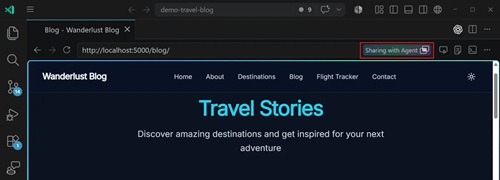 [Click on image for larger view.] Browser Share Button (source: Microsoft).
The release also allows agents to request shared access to an open browser tab. Microsoft said agents now have information about how many browser tabs are open and not shared. When an agent needs to interact with a page, it can request sharing, and the user can approve or deny that request in a prompt. If an agent tries to open a new tab on the same domain as an existing unshared tab, VS Code can prompt the user to reuse the existing tab, with the stated goal of encouraging tab reuse and reducing clutter. The feature builds on earlier browser tools work in VS Code 1.110.
The related VS Code documentation for browser agent tools says those tools enable AI to build and verify web applications in a development loop. The tools can include page navigation, page reading, screenshots, user interaction and custom browser automation. The same documentation states: "Browser agent tools are currently experimental and may change in future releases."
Microsoft also listed updates to Visual Studio Code Agents, a companion experience currently in preview and available only with VS Code Insiders. Updates in 1.119 include a redesigned new session repository picker, sub-session improvements, web and mobile polish, environment management and continuity work, progress UX changes and what Microsoft called developer joy updates. The release notes say the Agents web client was introduced in VS Code 1.118 and continues to be adjusted to align the browser experience with the desktop experience.
OpenTelemetry Support Arrives for Agent Sessions
VS Code 1.119 adds OpenTelemetry tracing for Copilot Chat agent sessions. The release notes identify two settings: github.copilot.chat.otel.enabled and github.copilot.chat.otel.otlpEndpoint. Microsoft said Copilot Chat agent sessions, including the local agent, the Copilot CLI background agent and the Claude agent, now emit OpenTelemetry traces, metrics and events that follow GenAI semantic conventions.
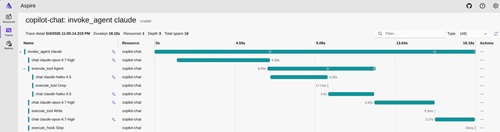 [Click on image for larger view.] OpenTelemetry (source: Microsoft).
The VS Code documentation for monitoring agents with OpenTelemetry says the feature can be used to understand agent behavior, token usage and performance. In the release notes, Microsoft said each user request produces an invoke_agent root span, with nested chat, execute_tool and execute_hook child spans. Subagent invocations are parented to the calling agent's execute_tool span, giving users a connected trace. Spans report model and token usage, including cache read and cache creation breakdowns.
The chat experience also received model detail changes for Copilot CLI and Claude agent responses. A setting named github.copilot.chat.agent.modelDetails.enabled controls whether model details are shown. According to Microsoft, responses in the Chat view now show the model and its multiplier on each response, and the badge appears live as each response completes. When Auto model selection is used in Copilot CLI, the badge displays the actual model used instead of auto. The behavior is enabled by default and can be turned off by disabling the setting and reloading the window.
Another experimental chat feature aims to reduce token use for agent todo lists. The github.copilot.chat.agent.backgroundTodoAgent.enabled setting allows todo list management to be offloaded to a lightweight background agent. Microsoft said the main model can then focus on the actual task while a smaller model keeps progress tracking in sync. When the setting is enabled, the background agent monitors main agent activity and updates the todo list to reflect completed and in-progress work. The feature is disabled by default.
Trust, Security and Billing-Related UI Work
The release includes trust and security changes for agent sandboxing. A chat.agent.sandbox.enabled setting now has an allowNetwork mode. Microsoft said that mode keeps file system restrictions in place while removing network domain blocking, so agent workflows can install packages, call APIs or run development servers without repeated network prompts. When network access is allowed for the sandbox, the chat.agent.allowedNetworkDomains and chat.agent.deniedNetworkDomains settings are ignored.
The VS Code trust and safety documentation describes agent sandboxing as a way to reduce risk by limiting what agent tools can access. In 1.119, Microsoft also changed temp folder write handling. When chat.tools.terminal.blockDetectedFileWrites is set to its default outsideWorkspace value, terminal commands that write outside the workspace require approval. Writes to the operating system temporary folder are now exempt from this check when Allow All Commands in Session is active. The release notes list /tmp on macOS and Linux and %TEMP% on Windows.
The release notes also mention usage-based billing updates for GitHub Copilot. Microsoft said GitHub Copilot is transitioning to usage-based billing starting June 1. VS Code 1.119 includes internal changes to the chat status dashboard, chat input notifications and model picker to support billing and credit information. The release notes state that those UI updates are not yet visible to users and will take effect when usage-based billing rolls out. GitHub's official documentation provides additional information about usage-based billing for individuals.
Markdown and Engineering Updates
VS Code 1.119 adds more discoverable controls for switching between Markdown source and preview. In a Markdown file, users can select a toolbar button or run the Markdown: Switch to Preview View command. From preview, users can select the Switch to Editor View button or command to return to the source code view.
Microsoft also reorganized Markdown settings in the Settings editor. The release notes say settings for VS Code's built-in Markdown support now have basic groups under Extensions > Markdown Language Features. All setting IDs remain the same, but settings related to the built-in Markdown preview are now listed under the Preview subsection.
On the engineering side, VS Code webviews now use CSS anchor positioning to position themselves visually in the workbench. Microsoft said this improves performance and makes relayouts more responsive, particularly when many webviews are active. The release notes also say the change helped fix long-standing bugs, including webviews going out of position on web when the workbench was moved.
The release also finishes migration of VS Code typechecking to TypeScript 7 for built-in extensions and core code. Microsoft said the prior iteration moved VS Code's main watch task to TypeScript 7, and 1.119 completes the migration. The release notes state that migrating the Copilot extension to TypeScript 7 cut typechecking time from 22 seconds to four seconds.
Deprecations
Microsoft listed no new deprecations in VS Code 1.119. The release notes continue to list Edit Mode as officially deprecated as of VS Code version 1.110. Microsoft said users can temporarily re-enable Edit Mode through the chat.editMode.hidden setting through version 1.125. Beginning with version 1.125, Edit Mode will be fully removed and can no longer be enabled through settings.
About the Author
David Ramel is an editor and writer at Converge 360.